How to Set Up a Ledger Hardware Wallet (Step by Step)
A Ledger is a hardware wallet: a small device that keeps your keys offline on a secure chip, so even a compromised computer can't sign a transaction without you physically approving it. This guide covers setting one up safely — and the steps where mistakes are most expensive.
The 20-second version
Buy a Ledger only from ledger.com or an authorised reseller. Set it up yourself, let the device generate a brand-new recovery phrase, and write those words on paper stored offline. The device should never arrive with a phrase already filled in — that's a scam.
Step 1: Buy from the right place
Where you buy matters as much as how you set it up. Purchase a Ledger directly from ledger.com or an officially listed reseller — never second-hand, never from a marketplace seller, and never from a link someone sent you. A tampered or pre-configured device can hand your funds straight to a thief.
Never use a pre-filled recovery phrase
A genuine Ledger arrives with no recovery phrase. If a device comes with words already written down, a 'scratch card' phrase, or instructions to use a supplied phrase, it is a scam — do not transfer any funds to it.
Step 2: Initialise the device yourself
Install Ledger Live only from ledger.com or your official app store, then connect the device and follow the on-screen setup. Crucially, you generate the secret on the device itself — it never touches your computer or the internet.
- Connect the Ledger and choose 'Set up as new device'.
- Choose your own PIN directly on the device. Don't reuse a PIN from elsewhere.
- Let the device display a brand-new recovery phrase (24 words on most Ledger models).
- Write the words on the supplied card or your own paper, by hand, in exact order.
- Confirm the words on the device when prompted to verify your backup is correct.
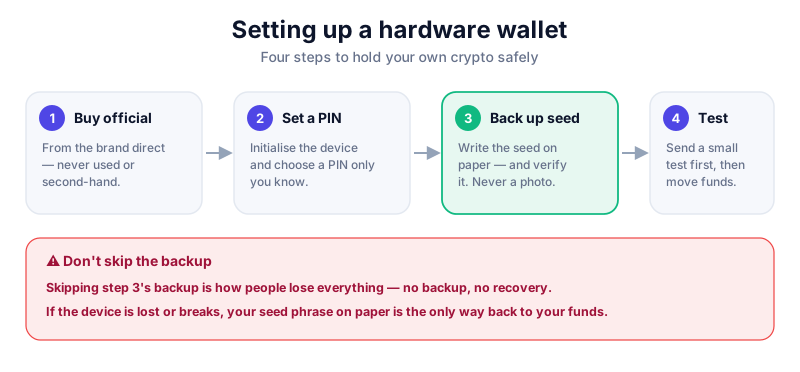
Step 3: Protect your recovery phrase
Your recovery phrase is the master backup of every account on the device. If the Ledger is lost, stolen or broken, those words restore your funds onto a new device — so they must survive while staying secret.
The phrase never goes digital
Never type your recovery phrase into a computer or phone, never photograph it, and never enter it on any website — not even one claiming to be Ledger. Ledger support will never ask for it. Store the paper offline, ideally in two secure locations.
- Keep your PIN and recovery phrase separate from each other.
- Consider a fireproof or metal backup for long-term holdings.
- Test recovery only if you understand the risks — most people never need to.
Step 4: Add accounts and send a test
In Ledger Live, add the coins you want (for example Bitcoin or Ethereum) and use the device to confirm a receiving address on its own screen before relying on it. Every outgoing transaction must be physically approved on the device — that's the whole point of cold storage.
- Always verify the receiving address on the Ledger screen, not just your computer.
- Send a small test amount first, confirm it arrives, then move the rest.
- You can connect your Ledger to apps like MetaMask to sign Web3 transactions offline.
The Ledger Nano X pairs secure-chip storage with Bluetooth and broad coin support. Read our full review before you buy — and only buy direct.
Key takeaways
- Buy a Ledger only from ledger.com or an authorised reseller.
- A genuine device generates a fresh recovery phrase — never use a pre-filled one.
- Keep your recovery phrase on paper, offline, and never digital.
- Verify addresses on the device and send a test amount first.
Frequently asked questions
Ledger Nano X or Nano S Plus?
Both use the same secure-chip storage. The Nano X adds Bluetooth and more app memory; the S Plus is a cheaper, wired option. See our Ledger Nano X review to compare.
What if I lose my Ledger?
Your funds are safe as long as you have your recovery phrase. Buy a new device and restore from the phrase. That's exactly why the phrase matters so much — and why it must stay secret.
Is a hardware wallet overkill for small amounts?
For pocket-money sums, a reputable phone or browser wallet is fine. A hardware wallet earns its keep once you're holding an amount you'd be genuinely upset to lose.
Keep reading
How to Set Up a Trezor Hardware Wallet (Step by Step)
Set up a Trezor hardware wallet safely: buy from the manufacturer, generate your recovery seed on-device with
Hot vs Cold Wallets: What's the Difference?
A plain-English hot vs cold wallets comparison — how each works, the security trade-offs, and how to combine b
How to Store Bitcoin Safely (Step by Step)
Keep your Bitcoin safe from hackers and mistakes: hot vs cold wallets, hardware wallets, seed-phrase backups,