How to Set Up a Withdrawal Whitelist (Step by Step)
A withdrawal whitelist is one of the simplest and most powerful security settings on a crypto exchange. It restricts withdrawals so funds can only ever leave to addresses you've approved in advance — meaning that even if an attacker gets into your account, they can't send your coins to their own wallet. This guide explains how it works and how to turn it on.
The 20-second version
A whitelist (or 'address allowlist') is a list of pre-approved withdrawal addresses. Once it's on, withdrawals to any other address are blocked. Combined with two-factor authentication, it's one of the best protections against account takeovers.
What a withdrawal whitelist does
Normally, an exchange lets you withdraw to any address you paste in. That's convenient, but it's also exactly how stolen accounts are drained: an attacker logs in, pastes their own address, and sends everything out.
A whitelist closes that door. You tell the exchange, in advance, which addresses are allowed to receive withdrawals. Any attempt to withdraw to an address not on the list is rejected — no matter who is logged in.
Pair it with self-custody
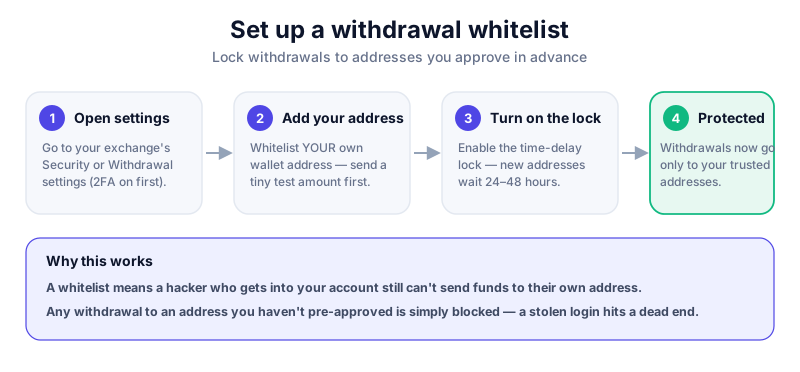
Whitelist the address of your own hardware wallet so the only place your coins can go is somewhere you control. That turns a stolen login into a dead end.
How to set up a whitelist
The exact wording varies by exchange, but the flow is almost identical everywhere. Look under Security or Withdrawal settings.
- Make sure two-factor authentication (2FA) is already enabled on your account — the whitelist builds on it.
- Go to Settings, then Security or Withdrawal Address Management.
- Find the 'Withdrawal whitelist' or 'Address allowlist' option and turn it on.
- Add each address you actually use — for example, your own hardware wallet. Send a tiny test amount first to confirm it's correct.
- Confirm the change with your 2FA code and any email confirmation the exchange sends.
Most major exchanges, including Kraken and Coinbase, support address whitelisting. Log in and review your security settings today — it takes minutes and costs nothing.
The 'time lock' that protects new addresses
Good exchanges add a deliberate delay — often 24 to 48 hours — before a newly added address can receive a withdrawal. This is a feature, not a bug.
- If an attacker adds their own address, the delay gives you time to notice and react.
- You'll usually get an email when a new address is added — never ignore those alerts.
- Plan ahead: add addresses you'll need before you actually need to withdraw.
Never disable it on someone's instruction
If anyone — a 'support agent', a caller, or a message — pressures you to remove your whitelist or add an unfamiliar address, stop. That is exactly how scammers bypass this protection. Legitimate support will never ask for this. See how to avoid crypto scams.
What a whitelist can't do
A whitelist protects withdrawals from your exchange account. It doesn't protect coins held in a self-custody wallet, and it won't help if you whitelist an address you don't control. The fundamentals still matter.
- It only governs withdrawals from that one exchange account.
- It can't undo a withdrawal you authorised yourself.
- It's a layer on top of, not a replacement for, strong 2FA and a unique password.
Think of it as one strong lock among several. Combine it with safe storage habits and an understanding of seed phrases for real protection.
Key takeaways
- A whitelist restricts withdrawals to addresses you've pre-approved.
- It turns a stolen login into a dead end if your own wallet is the only allowed destination.
- Newly added addresses often carry a 24–48 hour delay — that delay protects you.
- Never remove your whitelist because someone told you to; that's a scam tactic.
Frequently asked questions
Does every exchange offer a withdrawal whitelist?
Most reputable exchanges do, though they may call it an 'address allowlist' or 'withdrawal address management'. Check your Security settings; if your platform has no such feature, that's a reason to consider a better one.
Why is there a delay before I can use a new address?
The delay — usually 24 to 48 hours — gives you time to spot and cancel any address an attacker secretly adds. It's an intentional safety buffer, so add the addresses you need in advance.
Is a whitelist enough on its own?
No. It's a strong extra layer, but you still need a unique password, two-factor authentication, and good storage habits. Defence in depth is the goal.
Keep reading
How to Set a Crypto Price Alert (Step by Step)
Price alerts notify you when a coin hits a level you choose, so you don't have to watch charts all day. Learn
How to Track Your Crypto Portfolio (Beginner's Guide)
Keep an organised, accurate view of your crypto holdings across exchanges and wallets. Learn the main ways to
How to Avoid Crypto Scams: The Cornerstone Safety Guide
The common crypto scams — fake support, phishing, giveaways, romance and rug pulls — and the simple habits tha