How to Set Up Trust Wallet (Step by Step)
Trust Wallet is a popular mobile, self-custody wallet that supports many blockchains in one app — Bitcoin, Ethereum, BNB Chain, Solana and more. Because you hold the keys yourself, setting it up carefully matters. This guide covers a safe install, a proper backup, and the scams to watch for.
The 20-second version
Install Trust Wallet only from the official App Store or Google Play. Create a wallet, then write your 12-word recovery phrase on paper and keep it offline. That phrase controls your money — never enter it into a website or send it to anyone.
Before you start
Trust Wallet is self-custody: there is no company holding your coins and no password-reset desk. The trade-off for that freedom is responsibility — if you lose your recovery phrase, no one can recover your funds. Treat the backup step as the most important part of setup.
- A phone you trust, with a screen lock enabled.
- Pen and paper for the recovery phrase — never a notes app or screenshot.
- A few uninterrupted minutes.
Step 1: Download from the right place
Get Trust Wallet only from the Apple App Store or Google Play, and check the publisher is 'Trust Wallet'. Fake wallet apps regularly slip into stores and search ads, and they exist solely to capture your recovery phrase.
Verify the publisher
Confirm the developer name and review count before installing. If you arrived via an ad, a link in a message, or a QR code someone sent you, stop and navigate to the store yourself.
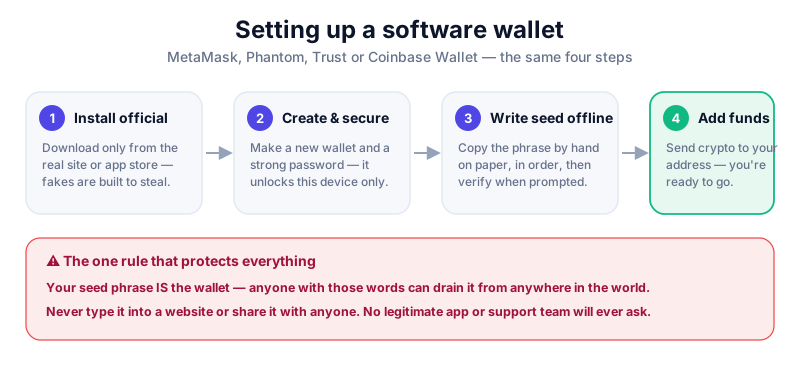
Step 2: Create and back up your wallet
- Open Trust Wallet and choose 'Create a new wallet'.
- Accept the terms and set a passcode or biometric lock for the app.
- When the app shows your 12-word recovery phrase, write it on paper by hand, in order.
- Confirm the words when prompted, then store the paper offline — ideally two copies in two safe locations.
- Never screenshot the phrase or save it to cloud storage, email, or a password manager.
Your recovery phrase is the master key
Anyone with your 12 words can take everything in the wallet. Trust Wallet will never ask for it, and no genuine support agent ever will. Any site or person asking you to type it in is trying to rob you.
Step 3: Receive, send and connect carefully
Each coin has its own address — always pick the right network when receiving funds, and send a small test amount first. Trust Wallet also includes a browser for connecting to DeFi apps, so review every connection and signing request before you approve it.
- Double-check the receiving network matches the coin (sending to the wrong network can lose funds).
- Be cautious with unknown tokens that appear in your wallet — they can be scam 'airdrops' linking to malicious sites.
- For larger holdings, keep most funds in cold storage such as a hardware wallet.

A hot wallet is handy for everyday use, but savings belong offline. The Trezor Safe 5 keeps your keys on-device — see our reviews before buying.
Key takeaways
- Install Trust Wallet only from the official App Store or Google Play.
- Write your 12-word recovery phrase on paper and store it offline.
- No legitimate app or agent will ever ask for your recovery phrase.
- Send a test amount first and keep large holdings in cold storage.
Frequently asked questions
Is Trust Wallet safe?
The app itself is reputable and self-custody, so security largely comes down to you: a safe download, an offline recovery-phrase backup, and care with which apps and links you trust.
Which coins does Trust Wallet support?
Many, across multiple blockchains including Bitcoin, Ethereum, BNB Chain and Solana, plus their tokens. Always select the correct network when sending or receiving.
Can I recover my wallet on a new phone?
Yes. Install Trust Wallet on the new device and restore using your 12-word recovery phrase. That phrase — not your passcode — is your real backup.
Keep reading
How to Set Up MetaMask (Step by Step)
A beginner's guide to setting up the MetaMask wallet safely: install the extension, back up your seed phrase,
How to Set Up Phantom Wallet (Step by Step)
Set up the Phantom wallet for Solana and beyond: install it safely, back up your recovery phrase, and avoid th
What Is a Seed Phrase? (And Why You Must Never Share It)
A plain-English guide to seed phrases: what they are, how they back up your crypto wallet, how to store one sa