Ledger vs Trezor: Which Hardware Wallet Should You Choose?
Ledger and Trezor are the two best-known hardware wallet makers, and both keep your keys offline far more safely than any app. This guide compares them fairly so you can pick the one that fits how you think about security.
The 20-second version
Both are excellent cold wallets. Ledger uses a certified secure-element chip and supports the most coins, but its firmware is only partly open-source. Trezor is fully open-source and loved by purists, but covers fewer coins. Either is a huge upgrade over keeping crypto in an app.
Why a hardware wallet at all
A hardware wallet keeps your private keys on a dedicated offline device, so transactions are signed without ever exposing your keys to your internet-connected computer or phone. This is the practical difference between hot and cold wallets, and it's the single biggest security upgrade most people can make.
This is education, not advice
We don't tell you what to buy or hold. Both devices protect keys you already own — they don't make crypto less volatile. Only ever risk what you can afford to lose, and buy any hardware wallet directly from the manufacturer, never second-hand.
Ledger vs Trezor at a glance
Here's how the flagship models stack up. Both companies sell a premium model and a cheaper entry model, so we've included the popular options.
| Feature | Ledger (Nano X) | Trezor (Safe 5) |
|---|---|---|
| Our review score | 4.8 | 4.7 |
| Secure-element chip | Yes (CC EAL5+) | Yes (EAL6+) |
| Open-source firmware | Partial | Fully open-source |
| Touchscreen | No | Yes |
| Bluetooth / mobile | Yes (Nano X) | No |
| Coins supported | 5,000+ | 1,000+ |
| Entry model | Nano S Plus | Safe 3 / Model T |
| Best for | Most people, widest coin support | Open-source purists |
Security and trust
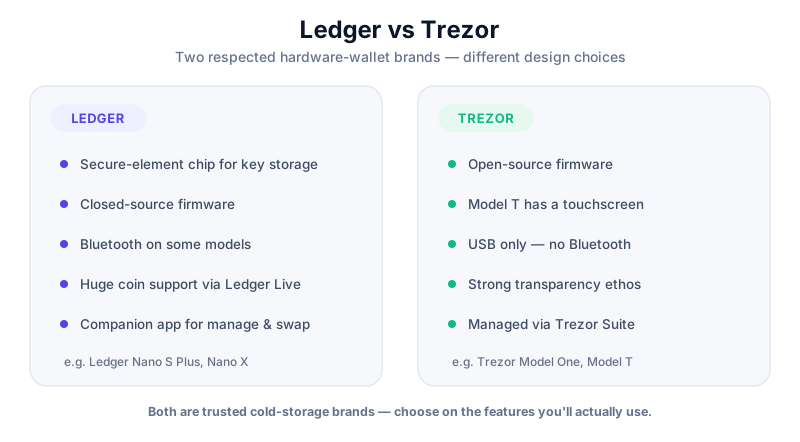
Both wallets store keys on a certified secure-element chip and require you to physically confirm every transaction on the device, which defeats most remote attacks. The philosophical difference is openness: Trezor's firmware is fully open-source, so anyone can audit it, while Ledger's secure-element code is partly closed. Neither approach is objectively 'safer' — it's about what you trust.
- Ledger had a 2020 *marketing-database* breach that exposed customer contact details — not keys or devices. It triggered phishing campaigns but no funds were stolen via the device itself.
- Trezor's open-source design lets the community verify the code, but its early models were shown to be vulnerable to sophisticated *physical* attacks if someone had the device in hand — mitigated by setting a strong PIN and passphrase.
- Either way, your security ultimately rests on your seed phrase: never type it into a computer, photograph it, or share it with anyone.
No one needs your seed phrase
Neither Ledger nor Trezor support will ever ask for your recovery phrase. Any site, email or 'wallet sync' tool that asks for it is a scam. See how to avoid crypto scams.
Everyday use and coin support
Ledger's companion app, Ledger Live, is polished and supports over 5,000 coins, and the Nano X adds Bluetooth so you can manage funds from your phone. Trezor's Suite is clean and the Safe 5's touchscreen makes confirmations easier to read, but it supports fewer assets and has no mobile Bluetooth option.
If you hold a wide spread of coins or want mobile access, Ledger has the edge. If you value an auditable, fully open stack and mostly hold major coins, Trezor is compelling.
The verdict
Choose Ledger if…
You want the widest coin support, a polished app and optional Bluetooth for mobile. The Ledger Nano X is our overall pick for most people, and the Nano S Plus is a great-value entry point.
Choose Trezor if…
Open-source transparency matters to you and you mostly hold major coins. The Trezor Safe 5 is the modern flagship; the older Model T remains a solid touchscreen option.
The Ledger Nano X balances security, coin support and convenience. If you buy through our link we may earn a commission at no cost to you — it never changes our verdicts. Always buy direct from Ledger, never second-hand.
Key takeaways
- Both Ledger and Trezor are excellent, secure-element cold wallets.
- Ledger supports the most coins and offers Bluetooth; firmware is partly closed.
- Trezor is fully open-source but covers fewer assets.
- Whichever you pick, buy direct from the maker and guard your seed phrase.
Frequently asked questions
Is Ledger or Trezor safer?
Both use certified secure-element chips and are very safe when set up correctly. Trezor is fully open-source (auditable); Ledger supports more coins and adds Bluetooth. The bigger risk for either is user error — phishing or mishandling your seed phrase — not the hardware.
Can I use the same wallet for Bitcoin and Ethereum?
Yes. Both Ledger and Trezor support Bitcoin, Ethereum and thousands of other assets from one device, each with its own accounts.
Where should I buy a hardware wallet?
Always direct from Ledger.com or Trezor.io, never from a marketplace or second-hand seller — a tampered device or a pre-filled seed phrase is a classic theft setup.
Keep reading
Ledger Nano X Review (2026)
Our hands-on Ledger Nano X review: security, supported coins, app experience, pros and cons, and how it compar
Trezor Safe 5 Review (2026)
Our hands-on Trezor Safe 5 review: a colour touchscreen, a dedicated secure element, fully open-source firmwar
Hot vs Cold Wallets: What's the Difference?
A plain-English hot vs cold wallets comparison — how each works, the security trade-offs, and how to combine b