How to Receive Crypto (Step by Step)
Receiving crypto means giving someone the right address on the right network and confirming the funds land. It's lower-risk than sending — you can't lose money you're being given — but a wrong network or a copied-wrong address still means a payment that never arrives. Here's how to do it cleanly.
The 20-second version
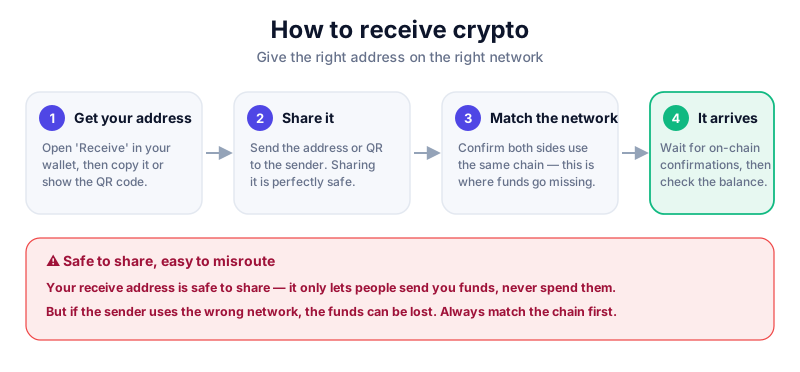
Open your wallet's 'Receive' screen, pick the coin and network, then share the address or QR code with the sender. Sharing your address is safe — it only lets people send you funds. Always confirm the sender uses the same network.
Where your receive address comes from
Your wallet generates addresses from the keys it holds. When you tap 'Receive', it shows an address as text and as a QR code. Anyone can send funds to it, but only you — holding the matching keys — can spend what arrives. That's why sharing a receive address is perfectly safe.
Address ≠ seed phrase
A receive address is safe to share publicly. Your seed phrase is the opposite — it controls your whole wallet and must never be shared with anyone, for any reason.
How to receive crypto, step by step
- Open your wallet and tap 'Receive' (sometimes 'Deposit').
- Choose the exact coin you're expecting — each coin has its own address.
- Choose the network and confirm the sender will use the same one.
- Share the address by copying it or letting the sender scan the QR code.
- Ask the sender to do a small test send first if the amount is large.
- Wait for the transaction to confirm, then check the balance appears in your wallet.
A hardware wallet can display your receive address on its own screen, so you know malware on your computer hasn't shown you a fake. The Ledger Nano X does this — see our review.
Confirming the funds arrived
After a send, the transaction sits as 'pending' until the network confirms it. You can track it yourself by pasting the address or transaction ID into a block explorer — a public search engine for the blockchain. Once it shows enough confirmations, the funds are yours.
- Pending means broadcast but not yet confirmed.
- Confirmed means it's recorded in a block and safe to rely on.
- If nothing arrives, check the sender used the right address and network.
Key takeaways
- Sharing a receive address is safe — it only lets people pay you.
- Never confuse a receive address with your seed phrase, which is secret.
- The sender must use the same network as your address.
- Use a block explorer to confirm incoming funds actually arrived.
Frequently asked questions
Is it safe to post my crypto address publicly?
Yes — an address only lets people send you funds. The trade-off is privacy: anyone can see that address's balance and history on a public block explorer.
Why hasn't my crypto arrived yet?
It may still be confirming, especially on a busy network. If it's been a long time, double-check the sender used the correct address and the matching network.
Can I reuse the same receive address?
Usually yes, though some wallets generate a fresh address each time for privacy. Old addresses normally keep working.
Keep reading
How to Send Crypto (Step by Step)
A plain-English guide to sending cryptocurrency: copying the right address, picking the correct network, fees,
How to Read a Block Explorer
A beginner's guide to block explorers: how to look up a transaction, read confirmations and fees, check an add
How to Do a Test Transaction (and Avoid Costly Mistakes)
Why a small test transaction is the simplest habit in crypto, when to use one, and how to do it step by step b