Bitcoin Wallets Explained
Last lesson we said safe storage is really about protecting keys, and we met hot and cold wallets in passing. Now let's slow right down and look properly at the wallet itself — because 'wallet' is one of the most misleading words in all of crypto. A Bitcoin wallet isn't a pocket that holds coins; it holds the keys that prove the coins are yours. Get your head around the types, and the trade-offs between them, and you've learned the difference between keeping your Bitcoin safe and losing it to an avoidable mistake.
The 20-second version
A wallet stores the keys to your Bitcoin, not the Bitcoin itself. Custodial wallets are held by a company; self-custody wallets are controlled only by you. Hot wallets are online and convenient; cold wallets are offline and safest. Match the type to how much you hold, and upgrade as you grow.
What a wallet actually holds
Let's bury the myth properly. Your Bitcoin never leaves the blockchain — it's just an entry on that shared public ledger, the same as everyone else's. A wallet simply stores the keys that let you control your entry. There are two of them. A public key works like an account number you can share freely so people can send you funds. A private key is the secret that authorises spending. Share the public key as much as you like; guard the private key like it's the only thing standing between you and an empty account, because that is exactly what it is. Lose it and you lose access; let someone else get it and they can take everything, instantly and irreversibly.
To make this manageable for humans, most wallets boil all of that down to a single seed phrase — usually 12 to 24 words — that can regenerate every key you'll ever need. Think of the seed phrase as the master key to the whole building: lose it and you're locked out, copy it onto a thief's keyring and they own the place. That's why, throughout this course, protecting it is the one rule we keep circling back to. Everything else is detail; this is the spine.
Never share your seed phrase
No exchange, wallet, or support agent will ever ask for your seed phrase. Anyone who does is trying to steal your Bitcoin, full stop. Write it on paper, store it offline, and never type it into a website, no matter how official the page looks or how urgent the message sounds.
Custodial vs self-custody
The first big choice is simply this: who holds the keys? This single decision shapes everything about how your Bitcoin behaves — how safe it is, who can freeze it, and who's responsible when something goes wrong. It's worth pausing on before anything else.
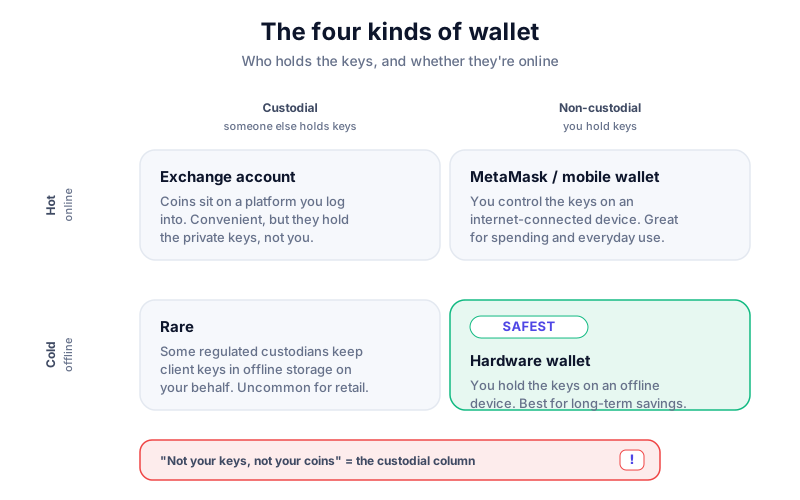
- Custodial — a company (like an exchange) holds the keys for you. It's easy: forget your password and they can reset it, much like a bank. But you're trusting them with your money, and 'not your keys, not your coins' applies — they can be hacked, freeze your account, or fail and take your funds with them.
- Self-custody — you hold the keys yourself. You get total control, and no third party can freeze you out or lose your funds in their own collapse. The flip side: the responsibility for backups is entirely yours, with no reset button and no one to phone.
Neither is automatically 'right' — it's a genuine trade-off between convenience and control, not a moral test. In practice, many people keep small, active amounts custodially for ease and move serious savings into self-custody for safety, which is a perfectly sensible split. To go deeper, custodial vs non-custodial wallets lays out the trade-off in full.
Hot wallets vs cold wallets
Among self-custody wallets, the next split is whether the keys ever touch the internet. It's the same hot-versus-cold idea from the last lesson, now laid out side by side so the trade-offs are clear at a glance.
| Type | What it is | Best for | Trade-off |
|---|---|---|---|
| Hot wallet | Software app on a phone or browser | Small, everyday spending amounts | Connected to the internet, so more exposed to malware and hacks |
| Cold wallet | Hardware device or paper, kept offline | Long-term savings and larger holdings | Less convenient for frequent spending |
Popular hot wallets include MetaMask and Trust Wallet — free, quick to set up, and perfectly fine for pocket-money sums. For a fuller comparison of the two camps, read hot vs cold wallets, and for the device side, hardware vs software wallets.
Hardware wallets: the gold standard for savings
A hardware wallet is a small physical device — about the size of a USB stick — that keeps your private keys on a secure chip and signs transactions offline. The clever part is that the keys never leave the device, even when you plug it into a computer. So even if your laptop is riddled with malware, an attacker can see your screen but simply can't reach your keys — they're sealed away on a chip that never hands them over. For anything you'd be upset to lose, this is the standard recommendation, and it's worth every penny of the modest price. It turns 'I hope my computer is clean' into 'it doesn't matter if it isn't'.
Buy direct, every time
Only ever buy a hardware wallet directly from the manufacturer. Never buy one second-hand or from a third-party marketplace — a tampered or 'pre-configured' device is a classic theft. A genuine device always makes you generate your own brand-new seed phrase on first use; if yours arrives with one already written down, bin it.
The Ledger Nano X keeps your keys on a secure chip and supports thousands of coins. We may earn a commission at no cost to you, and it never changes our verdicts. Compare it with Trezor in Ledger vs Trezor before buying.
How to choose the right wallet
You really don't need to overthink this. Match the wallet to how much you're protecting, and upgrade as your holdings grow — there's no shame in starting simple. The right wallet is the one that fits the amount and how often you'll touch it.
- Just learning with pocket money? A reputable exchange or a well-known hot wallet is perfectly fine. Don't let anyone shame you into buying gear you don't need yet.
- Holding meaningful savings? Move to a hardware wallet and back up your seed phrase on paper, offline, in more than one place.
- Want belt-and-braces security? Combine both — a hot wallet for spending, cold storage for the rest — so a phone hack can never touch your savings.
Once you've chosen, lesson four — storing Bitcoin safely — gives you the step-by-step setup. Next up in the course is security and scams, and when you're ready for serious protection, our final lesson on advanced self-custody covers multisig and passphrases for larger holdings.
Key takeaways
- A wallet holds your keys, not your coins — protect the keys above all.
- Custodial means a company holds the keys; self-custody means you do.
- Hot wallets are convenient and online; cold wallets are offline and safest.
- Match the wallet to how much you hold, and buy hardware direct from the maker.
Frequently asked questions
Is a wallet app a bank account for Bitcoin?
Not quite. A self-custody wallet has no support desk and no password reset — if you lose the seed phrase, the funds are gone for good. That control is the whole point, but the responsibility lands squarely on you, which is a real difference from a bank.
Can one wallet hold different cryptocurrencies?
Many can. Multi-coin wallets and hardware devices like the Ledger Nano X support thousands of assets across different networks, though some wallets are built for a single chain only. Check the supported coins before you assume yours is covered.
What happens if my phone or hardware wallet breaks?
Your funds are safe as long as you have your seed phrase. Get a new device and restore from the phrase — which is exactly why that paper backup matters far more than the gadget itself. The device is replaceable; the phrase is not.
Keep reading
How to Store Bitcoin Safely (Step by Step)
Keep your Bitcoin safe from hackers and mistakes: hot vs cold wallets, hardware wallets, seed-phrase backups,
What Is a Seed Phrase? (And Why You Must Never Share It)
A plain-English guide to seed phrases: what they are, how they back up your crypto wallet, how to store one sa
Hot vs Cold Wallets: What's the Difference?
A plain-English hot vs cold wallets comparison — how each works, the security trade-offs, and how to combine b