How to Revoke Token Approvals (and Why It Matters)
Every time you use a DEX or DeFi app, you often grant a 'token approval' — permission for that app's contract to move a token from your wallet. Those permissions don't expire on their own. Reviewing and revoking the ones you no longer need is one of the easiest ways to reduce your risk if an app is ever compromised.
The 20-second version
Approvals let apps spend your tokens. Old or unlimited approvals are a standing risk: if that contract is exploited, your tokens can be drained. Use a reputable approval-checker tool to review and revoke permissions you no longer need.
What a token approval is
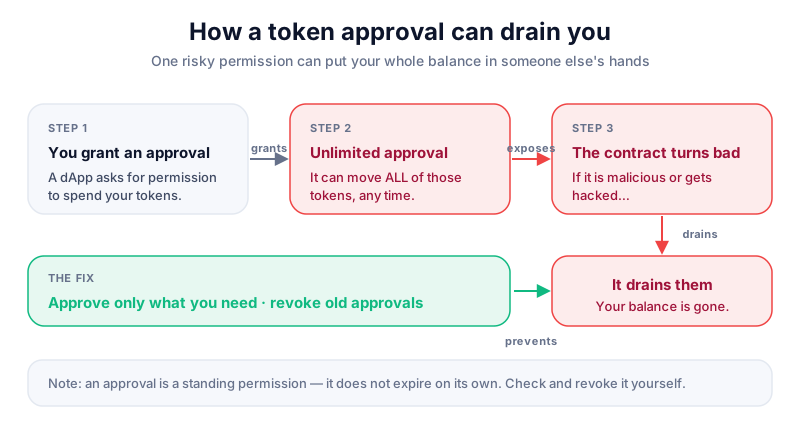
Smart contracts can't touch your tokens unless you let them. When you first trade a token on a DEX, it asks for an approval — permission to move that token on your behalf. This is normal and necessary. The catch is that many apps request an unlimited approval, and the permission stays in place long after you've stopped using the app.
Stale approvals are a real risk
If a contract you approved is later hacked or turns out to be malicious, an open approval can be used to drain that token from your wallet — without you signing anything new. Revoking unused approvals closes that door.
How to review and revoke approvals
- Open a reputable approval-checker tool — many block explorers have one built in, and dedicated revoke tools exist too.
- Connect your wallet (read-only) or simply paste your public address to see your active approvals.
- Review the list — note any unlimited approvals or apps you no longer use.
- Select an approval to revoke and confirm the transaction in your wallet.
- Pay the small network fee — revoking is an on-chain transaction.
- Repeat across each network you've used, since approvals are per-chain.
Rabby shows exactly what each approval grants and warns when an app asks for unlimited spending, helping you avoid stale permissions in the first place. Download only from the official site.
Good approval habits
- Prefer a capped approval over an unlimited one where the app offers the choice.
- Revoke approvals for apps you've stopped using, especially after a hack makes the news.
- Never grant an approval from a link in a DM or pop-up — that's a classic scam.
- Remember revoking costs a small fee but can save your whole token balance.
Key takeaways
- Approvals let apps move your tokens, and they don't expire by themselves.
- Unlimited or stale approvals are a standing security risk.
- Use a reputable tool to review and revoke approvals you don't need.
- Revoking is an on-chain action that costs a small network fee.
Frequently asked questions
Will revoking an approval move my tokens?
No. Revoking only cancels a permission. Your tokens stay exactly where they are — you're just removing a contract's ability to move them.
How often should I review approvals?
A periodic check is wise, and definitely after you stop using an app or hear that a protocol you used was exploited.
Is the revoke tool itself safe?
Reputable approval-checkers only need your public address to read approvals; you sign the actual revoke in your own wallet. Always reach such tools via their official URL, never a random link.
Keep reading
How to Use a DEX (Decentralised Exchange)
A beginner's guide to using a decentralised exchange: connecting a wallet, token approvals, slippage, fees, an
How to Swap Tokens (Step by Step)
How token swaps work: slippage, price impact, network fees, approvals, and how swapping on an exchange differs
How to Read a Block Explorer
A beginner's guide to block explorers: how to look up a transaction, read confirmations and fees, check an add