How to Use a DEX (Decentralised Exchange)
A decentralised exchange — a DEX — lets you trade tokens directly from your own wallet, with no account, no sign-up and no company holding your funds. That freedom comes with responsibility: you sign every action yourself, and there's no support desk to undo a mistake. Here's how to use one safely.
The 20-second version
A DEX lets you swap tokens straight from your wallet. You connect your wallet, approve a token, then swap. You keep custody throughout — but you also carry all the responsibility. Only ever reach a DEX through its official URL.
What a DEX is
A DEX is part of DeFi: instead of an order book run by a company, trades execute against pools of tokens governed by smart contracts. You connect a self-custody wallet like MetaMask, and the DEX never takes possession of your coins — it just helps you swap them.
The upside is openness: no account, available to anyone, listing thousands of tokens. The downside is that openness too — anyone can list a token, including scammers.
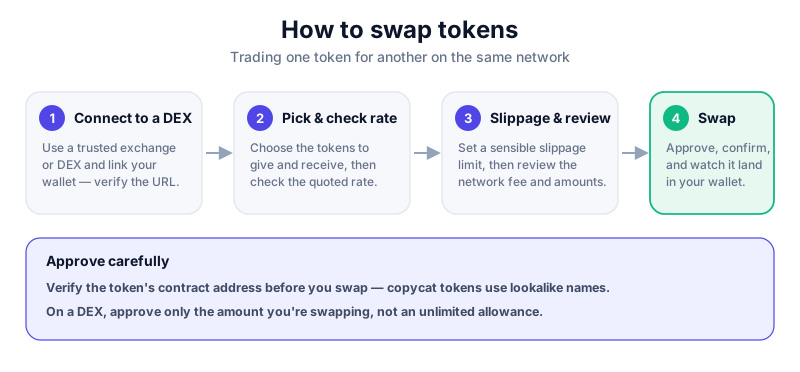
How to use a DEX, step by step
- Type the DEX's official address yourself or use a trusted bookmark — never click ads or links from social media.
- Connect your wallet and check the network shown matches the one you want to trade on.
- Select the token you're giving and the token you want, then paste the contract address to confirm you've got the real token.
- Approve the token if prompted — a one-time permission that costs a small fee.
- Set a sensible slippage tolerance, review the rate and network fee, then confirm the swap.
- After trading, consider revoking approvals you no longer need.
Rabby previews what each transaction will do and flags risky approvals before you sign — useful on a DEX where mistakes are permanent. Always download from the official site.
Staying safe on a DEX
There's no undo and no support line
On a DEX you are your own bank. No one can reverse a bad swap, recover funds sent to a scam token, or rescue you from a fake site. Move carefully, read each prompt, and only risk what you can afford to lose. This is education, not financial advice.
- Verify token contract addresses from an official source — scam tokens copy real names.
- Beware of fake DEX sites in search ads and DMs; bookmark the real one.
- Watch the slippage setting and the price impact on larger trades.
- Be cautious with unlimited token approvals — grant only what you need.
Key takeaways
- A DEX lets you trade from your own wallet with full custody.
- You sign every action — there's no support desk to fix mistakes.
- Verify token contracts and only reach the DEX via its official URL.
- Manage token approvals and slippage carefully.
Frequently asked questions
Do I need an account to use a DEX?
No. You connect a self-custody wallet and trade directly — there's no sign-up, KYC or company holding your funds. That also means no password reset or support line if something goes wrong.
Why does a DEX ask me to 'approve' a token?
An approval is a permission letting the DEX's contract move that specific token on your behalf. It's a one-time, fee-paying step — and one you can later revoke.
Are DEXs safe?
The technology is well-established, but the risk shifts to you: fake sites, scam tokens and unlimited approvals are the main dangers. Careful habits matter more here than anywhere else in crypto.
Keep reading
How to Swap Tokens (Step by Step)
How token swaps work: slippage, price impact, network fees, approvals, and how swapping on an exchange differs
How to Revoke Token Approvals (and Why It Matters)
Token approvals let apps spend your tokens — and stale ones are a real risk. How to review and revoke approval
How to Bridge Tokens Between Networks (Safely)
How crypto bridges move tokens between blockchains, why bridges are among the riskiest tools in crypto, and ho