How to Store Ethereum Safely (Step by Step)
Buying ETH is the easy part. Keeping it safe is where most people slip up — especially on Ethereum, where connecting to apps adds risks Bitcoin doesn't have. This lesson walks through storing ETH properly, from your first small amount to serious holdings, so a hack or a careless tap doesn't wipe you out. None of it is complicated; it's just a handful of habits that, once they're second nature, quietly protect you for years.
The 20-second version
Small amounts can live in a reputable app wallet like MetaMask. For anything you'd hate to lose, use a hardware wallet and write your seed phrase on paper, stored offline. Never share that phrase, and be careful what contracts you approve.
It's all about the keys
Here's the thing that trips people up: your ETH never actually leaves the blockchain. There's no coin sitting 'in' your wallet, the way notes sit in a physical one. What you really store are the keys that prove the coins are yours — summarised by a seed phrase of 12 to 24 words that can recreate those keys from scratch. Whoever holds the keys holds the funds. That's why 'not your keys, not your coins' is the most important phrase in all of crypto, and worth repeating until it sticks.
Think of the seed phrase as the master key to a safe that exists everywhere at once. Lose it and you can lose access forever; let someone copy it and they can empty the safe from the other side of the world, in seconds, while you sleep. No bank, no support line, no 'forgot password' link can save you. That sounds harsh, but it's the price of being your own bank — and it's entirely manageable once you respect it. Millions of people keep their keys safe with nothing more than care and a piece of paper.
Never share your seed phrase
Your seed phrase can restore your entire wallet on any device. No exchange, wallet app, support agent or website will ever legitimately ask for it. Anyone who does — by message, pop-up, phone call or 'verification' page — is trying to steal from you. There are zero exceptions to this rule.
Hot wallets vs cold wallets
Wallets come in two broad types, and most experienced users keep both — a hot wallet for spending and interacting with apps, a cold wallet for savings. The trade-off is simple: convenience versus exposure. The more connected and convenient a wallet is, the more ways there are for something to reach in and grab it. It's the same logic as not walking around with your entire life savings in your back pocket.
- Hot wallets like MetaMask or Trust Wallet live on your phone or in your browser. They're great for everyday use and for connecting to apps, but more exposed because they're always online — like the cash in your pocket: handy, but you don't keep much there.
- Cold wallets keep keys offline on a hardware device that never exposes them to the internet. They're slower to use but far safer — like a savings vault you visit deliberately rather than dip into hourly.
For a fuller breakdown, see hot vs cold wallets. The good news is you don't have to choose: you can connect a hardware wallet *through* MetaMask, getting app access in the browser while your keys stay locked offline on the device. Best of both worlds — the convenience of a hot wallet with the protection of a cold one, and it's how a lot of careful people run their setup.
How to set up safe storage
Setting up properly takes maybe twenty minutes and saves you from the most common disasters. Work through it carefully the first time — rushing this step is exactly where people make the mistakes that hurt later:
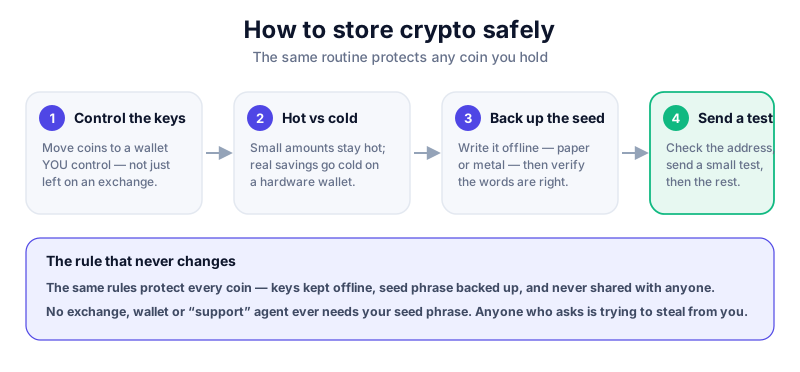
- Decide how much you're protecting. Pocket money can stay in a reputable app wallet; serious savings should move to a hardware wallet. Match the lock to the value behind it — there's no point in a vault for loose change, or a tin box for your life savings.
- Buy a hardware wallet direct from the manufacturer — never second-hand or from a marketplace, where a device could have been tampered with or pre-loaded with a known seed phrase before it reached you.
- Set it up yourself and let the device generate a brand-new seed phrase. A genuine device creates the phrase in front of you, just for you; it never arrives pre-printed or already filled in.
- Write the phrase on paper by hand and store it offline in a safe place — ideally two copies in two locations, in case one is lost to fire or flood. Never photograph it, type it, or save it to the cloud.
- Send a small test amount of ETH first, confirm it arrives, then move the rest across. A few pennies of gas is cheap insurance against a typo.
The Ledger Nano X keeps your keys on a secure chip and connects through MetaMask for app access. Buy direct from Ledger only. We may earn a commission at no cost to you — it never changes our verdict. Read the full review first.
An Ethereum-specific risk: token approvals
This is the bit that catches Ethereum users out, and it has no equivalent in plain Bitcoin storage — so even careful Bitcoiners can get blindsided. On Ethereum, using an app often means signing an approval — a permission that lets a smart contract move tokens from your wallet on your behalf. That's how a trade or a DeFi action actually works under the hood. But a malicious or buggy contract can abuse a broad, open-ended approval to quietly drain your funds later, long after you forgot you granted it. The danger often isn't the moment you click; it's the standing permission you leave behind.
- Read every wallet pop-up before signing. If you don't understand what it's asking for, don't approve it — close it and find out first. 'I'll just click through' is how a lot of wallets get emptied.
- Stick to apps you've actually researched, and avoid connecting your main wallet to unknown or random sites you found in an ad or a DM.
- Periodically review and revoke old approvals using a reputable approval-checker tool. Old, forgotten permissions are a common attack route — think of it as cancelling cards you no longer use.
- Consider a separate 'burner' wallet holding only small amounts for trying new apps, so your main savings are never on the line when you experiment.
Hardware wallet plus caution
A hardware wallet protects your keys, but it can't stop you from approving a bad contract — you're still the one tapping yes. The device asks you to confirm each action, so always read the details on its own screen, not just what the website claims. The screen is the source of truth.
Common mistakes to avoid
Almost every loss we see comes down to one of a handful of avoidable mistakes — not exotic hacks, just ordinary slip-ups repeated over and over. Learn this short list and you've sidestepped most of the danger:
- Storing your seed phrase as a photo, screenshot, or note on your phone or in the cloud — all of which can be hacked, and all of which sync to places you've forgotten about.
- Keeping large amounts on an exchange long-term, where you don't hold the keys and you're trusting the company to stay solvent and unhacked.
- Buying a 'pre-configured' wallet that came with a seed phrase already written down — that's a classic scam, and the phrase is known to the thief from the start, just waiting for you to deposit.
- Connecting your main wallet to random sites and approving whatever they ask without reading it, on the assumption it's probably fine.
And one habit worth burning in: if a message ever pressures you to 'verify your wallet' or move funds 'right now', slow down. Scammers manufacture urgency precisely because it makes you skip the checks — a calm person spots the fraud, a panicked one doesn't. When in doubt, read how to avoid crypto scams. With your ETH safely stored, the next lesson tackles a cost you'll meet every time you use it: gas fees.
Key takeaways
- You're storing keys, not coins — protect the keys (and your seed phrase) above all.
- Use a hot wallet for everyday use, a cold wallet for savings.
- A hardware wallet plus an offline paper seed phrase is the gold standard.
- On Ethereum, watch what contracts you approve — a bad approval can drain funds.
Frequently asked questions
Is MetaMask safe to store ETH in?
It's a reputable hot wallet, fine for small, active amounts. For larger holdings, connect a hardware wallet through MetaMask so your keys stay offline even while you use apps.
What if I lose my hardware wallet?
Your funds are safe as long as you have your seed phrase. Buy a new device and restore from the phrase — which is exactly why that phrase matters so much, and why you keep it backed up offline.
What is a token approval and why does it matter?
It's permission you grant a smart contract to move your tokens. A bad or overly broad approval can let an attacker drain your wallet later, so only approve apps you trust and revoke old ones.
Keep reading
What Is Ethereum? A Plain-English Guide
A beginner-friendly explanation of Ethereum: what it is, how it differs from Bitcoin, what smart contracts do,
What Is a Seed Phrase? (And Why You Must Never Share It)
A plain-English guide to seed phrases: what they are, how they back up your crypto wallet, how to store one sa
Hot vs Cold Wallets: What's the Difference?
A plain-English hot vs cold wallets comparison — how each works, the security trade-offs, and how to combine b