How to Store Polygon (POL) Safely
Buying POL is the easy part. Keeping it safe is where it really counts — and where beginners most often slip up. This guide explains how to store Polygon's POL token properly, from your first small amount to long-term holdings.
The 20-second version
Small amounts can sit on a reputable exchange or phone wallet. For anything you'd be upset to lose, use a hardware wallet and write your seed phrase on paper, stored offline. Never share that phrase with anyone, ever.
It's all about the keys
Your POL never really 'leaves' the Polygon network. What you store are the keys that prove the tokens are yours. Whoever controls the keys controls the funds — which is why 'not your keys, not your coins' is the most important phrase in crypto. Learn more about what a seed phrase is.
Never share your seed phrase
Your seed phrase (12–24 words) can restore your entire wallet. No exchange, wallet or support agent will ever ask for it. Anyone who does is trying to steal from you.
Hot wallets vs cold wallets
Wallets come in two broad types, and most people use both. Because Polygon is Ethereum-compatible, the same popular wallets that handle Ethereum tokens also handle POL — just make sure the wallet is set to the Polygon network. For the cold side, an EVM-friendly hardware wallet like OneKey keeps your POL offline. See hot vs cold wallets for the full picture.
- Hot wallets are connected to the internet (a phone or browser app like MetaMask). Handy for small, everyday amounts; more exposed to hacks.
- Cold wallets keep keys offline (a hardware wallet). The safest place for larger holdings.
How to set up safe storage
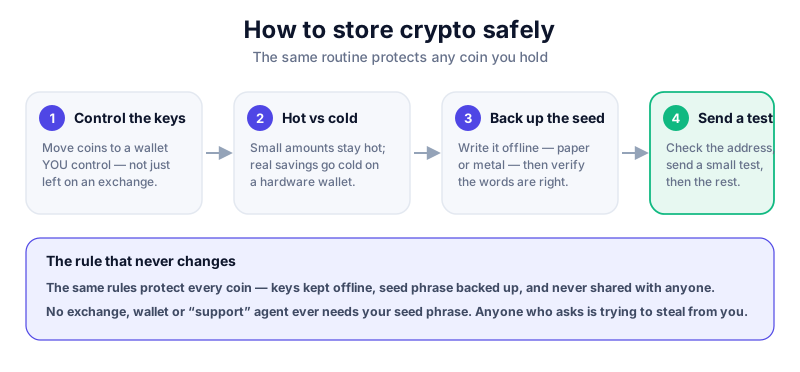
- Decide how much you're protecting. Pocket money can stay on a reputable exchange or hot wallet; serious savings should move to a hardware wallet.
- Buy a hardware wallet directly from the manufacturer — never second-hand or from a marketplace, which risks tampering.
- Set it up yourself and let the device generate a brand-new seed phrase. Write it on paper by hand.
- Store the paper offline in a safe place — ideally two copies in two locations. Never photograph it or type it into any device.
- Add the Polygon network in your wallet, then send a small test amount of POL first, confirm it arrives, and only then move the rest.
The Ledger Nano X keeps your keys on a secure chip and supports Polygon plus thousands of other coins. Compare it against Trezor in our hardware-wallet reviews before you buy.
Common mistakes to avoid
- Storing your seed phrase as a photo, screenshot or note on your phone.
- Sending POL on the wrong network — always confirm you're using the Polygon network before transferring.
- Keeping large amounts on an exchange long-term.
- Buying a 'pre-configured' wallet that arrived with a seed phrase already written down — that's a classic scam.
If you ever feel rushed
Scammers create urgency. Any message pushing you to move funds 'right now' or 'verify your wallet' is a red flag. Slow down and check independently. Read how to avoid scams.
Key takeaways
- You're really storing keys, not tokens — protect the keys.
- Use a hot wallet for spending, a cold wallet for savings.
- A hardware wallet plus an offline paper seed phrase is the gold standard.
- Always confirm you're on the Polygon network before sending POL.
Frequently asked questions
Can I store POL in MetaMask?
Yes. MetaMask supports Polygon — just add the Polygon network. For larger amounts, pair MetaMask with a hardware wallet so your keys stay offline.
Do I need a separate wallet for Polygon and Ethereum?
No. Because Polygon is Ethereum-compatible, most wallets handle both. You simply switch networks within the same wallet.
What if I lose my hardware wallet?
Your funds are safe as long as you have your seed phrase. Buy a new device and restore from the phrase. That's exactly why the phrase matters so much — and why you must never share it.
Keep reading
What Is Polygon (POL)? A Plain-English Guide
A beginner-friendly explanation of Polygon and its POL token: what it is, how it speeds up Ethereum, what it's
How to Buy Polygon (POL) Safely: Step by Step
A safe, beginner-friendly walkthrough for buying Polygon's POL token: choosing an exchange, verifying your acc
How to Store Bitcoin Safely (Step by Step)
Keep your Bitcoin safe from hackers and mistakes: hot vs cold wallets, hardware wallets, seed-phrase backups,