How to Store Solana (SOL) Safely: Step by Step
You've bought some SOL — now for the part that actually decides whether you keep it. Buying is the easy bit; storing it safely is where most people slip up, and where losses are usually permanent. This lesson walks through how to store Solana properly, from your first small amount to serious long-term holdings, using Phantom and a hardware wallet. Read it once and you'll be ahead of most of crypto.
The 20-second version
Small amounts can live in a reputable wallet like Phantom or on an exchange. For anything you'd be upset to lose, pair Phantom with a hardware wallet so your keys stay offline, and write your seed phrase on paper — not on any device. Never share that phrase with anyone, ever.
It's all about the keys
Here's a mental shift that makes everything else click. Your SOL never actually 'leaves' the Solana blockchain and sits inside your wallet, like coins in a purse. What you genuinely store are the keys — the secret codes that prove those coins are yours and let you move them. The blockchain is the vault; your keys are the only thing that opens your box. Whoever controls the keys controls the coins, full stop. That's why 'not your keys, not your coins' is the single most important phrase in all of crypto.
Those keys are, in turn, protected by your seed phrase: a list of 12 to 24 ordinary words that can rebuild your entire wallet from scratch. Lose the seed phrase and lose access to your device, and your SOL is gone for good — there's no 'forgot password' button. Let someone else see it, and they can drain you in seconds. Treat it like the master key to everything, because it is.
Never share your seed phrase
Your seed phrase can restore your entire wallet from anywhere in the world. No exchange, no wallet, no support agent — not Phantom, not Ledger, not anyone — will ever legitimately ask for it. Anyone who does, by message, email, call or pop-up, is trying to steal from you. There are no exceptions to this rule.
Hot wallets vs cold wallets
Wallets come in two broad flavours, and the good news is you don't have to pick a side — most people end up using both. The simplest analogy: a hot wallet is the cash in your pocket for daily spending, while a cold wallet is the safe at home for your savings. You wouldn't carry your life savings in your back pocket, and you wouldn't run to the safe to buy a coffee.
- Hot wallets are connected to the internet — a phone or browser app like Phantom. Brilliant for everyday use and DeFi, but because they're online, they're more exposed to hacks, malware and malicious websites.
- Cold wallets keep your keys completely offline on a dedicated hardware device. They're a little less convenient, and the safest place by far for larger holdings.
On Solana, you genuinely get the best of both. You can use Phantom as your friendly everyday interface — seeing balances, connecting to apps — while a hardware wallet quietly holds the actual keys offline. Phantom becomes the steering wheel; the hardware wallet keeps the engine locked away. That combination is what we'll set up below.
Using Phantom, the popular Solana wallet
Phantom is the best-known Solana wallet — a browser extension and mobile app that lets you hold SOL and tokens, connect to apps, swap and stake, all from a clean interface. It's an excellent everyday hot wallet. But used on its own, your keys live directly on your phone or computer, which means anything that compromises that device can reach them. So think of Phantom by itself as a spending wallet — great for daily use, not the place for your life savings.
Phantom is our pick for using Solana day to day — well-designed and widely trusted. It's free; we may earn a commission at no cost to you via some links, and it never changes our verdicts. For larger holdings, pair it with a hardware wallet as described below rather than relying on it alone.
Download from the official source only
Fake wallet apps and counterfeit browser extensions are a depressingly common scam — they look identical and then steal whatever you put in. Install Phantom only from its official website or your device's official app store, and double-check the publisher name before installing. When in doubt, slow down and verify.
How to set up safe storage
Here's the full routine for proper, grown-up storage. It takes maybe twenty minutes and protects you for years.
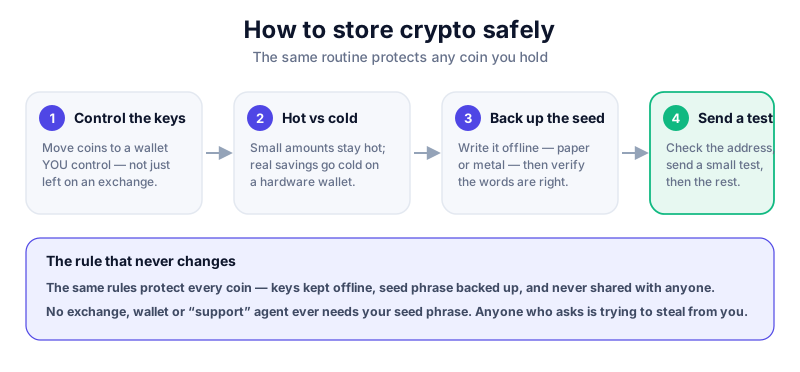
- Decide how much you're protecting. Pocket money can happily stay in Phantom or on a reputable exchange; serious savings should sit behind a hardware wallet. Match the security to the stakes.
- Buy a hardware wallet from the manufacturer directly — never second-hand and never from a random marketplace seller, both of which risk a tampered device.
- Set it up yourself and let the device generate a brand-new seed phrase in front of you. Write it down on paper by hand. A genuine device always makes you create the phrase; it never arrives with one ready-made.
- Connect the hardware wallet to Phantom. Now you can see and use your SOL through Phantom's friendly interface while the actual keys stay locked on the device, offline.
- Store the paper seed phrase offline somewhere safe — ideally two copies in two separate locations, in case of fire or loss. Never photograph it, never type it into a computer or phone, never store it in the cloud.
- Send a small test amount first, confirm it arrives, then move the rest. Always test before you trust.
The Ledger Nano X keeps your keys on a secure chip, supports Solana, and connects neatly to Phantom for that best-of-both setup. We may earn a commission at no cost to you — it never changes our verdicts. Read our full Ledger Nano X review first, and buy direct from Ledger only.
Common mistakes to avoid
Almost every lost-crypto story comes down to one of a small handful of avoidable mistakes. Read these once and you've dodged most of them:
- Storing your seed phrase as a photo, screenshot, password-manager note or text on your phone — the moment it's digital, it's reachable.
- Keeping large amounts on an exchange or in a hot wallet for the long term, where one breach or one mistake exposes the lot.
- Approving wallet 'connections' or token permissions on sites you don't fully trust — a single careless approval is one of the most common ways SOL and tokens get drained.
- Buying a 'pre-configured' hardware wallet that arrived with a seed phrase already written down. That's a classic scam — the thief already has a copy and is waiting for you to fund it.
Watch out for drainer scams
On Solana, malicious sites are designed to trick you into signing a transaction that quietly hands over your tokens. If a 'mint', 'airdrop' or 'support' site asks you to connect and sign something you don't understand, stop and walk away. When in doubt, don't sign. See how to avoid crypto scams for the full playbook.
Where to go next
With your SOL stored properly, you're ready to put it to work safely. The next lesson covers Solana staking explained — how locking up SOL can earn rewards, and the risks that get glossed over. Crucially, you can stake straight from Phantom while your keys stay on your hardware wallet, so the safe setup you've just built carries straight over.
Key takeaways
- You're really storing keys, not coins — protect the keys.
- Use Phantom for everyday use and a hardware wallet for savings.
- Pairing Phantom with a hardware wallet keeps keys offline yet usable.
- Never share, photograph or type your seed phrase anywhere.
Frequently asked questions
Is Phantom safe to use?
Phantom is a reputable, widely used wallet, and the app itself isn't the danger. The real risks are installing a fake copy or approving a malicious transaction — both of which are on the user, not the software. For larger amounts, connect it to a hardware wallet so your keys stay offline.
Do I really need a hardware wallet for SOL?
For small amounts, no — Phantom on its own is perfectly fine. For anything you'd be genuinely upset to lose, a hardware wallet that keeps your keys offline is well worth the modest cost. Think of it as a safe: overkill for loose change, sensible for savings.
What if I lose my hardware wallet?
Don't panic — your funds are safe as long as you still have your seed phrase. Just buy a new device and restore from the phrase, and your SOL reappears. That's exactly why the phrase matters so much, and exactly why you must keep it offline and private.
Keep reading
What Is Solana? A Plain-English Guide
A beginner-friendly explanation of Solana (SOL): what it is, how it differs from Bitcoin and Ethereum, what it
How to Buy Solana (SOL) Safely: Step by Step
A careful, step-by-step guide to buying Solana (SOL): choosing a reputable exchange, verifying your account, p
What Is a Seed Phrase? (And Why You Must Never Share It)
A plain-English guide to seed phrases: what they are, how they back up your crypto wallet, how to store one sa