Crypto Phishing Scams Explained (And How to Spot Them)
Phishing is the oldest trick in the online-crime book, and crypto has made it more profitable than ever. Instead of stealing a credit-card number that a bank can refund, a phishing scammer aims for your seed phrase or a wallet approval — and once those are gone, the money is gone for good. This guide shows you exactly how crypto phishing works and how to defend against it.
The 20-second version
Phishing tricks you into entering your password, seed phrase, or wallet approval on a fake site or message. No real service ever asks for your seed phrase. Check links carefully, never approve transactions you didn't start, and slow down when something feels urgent.
How phishing works
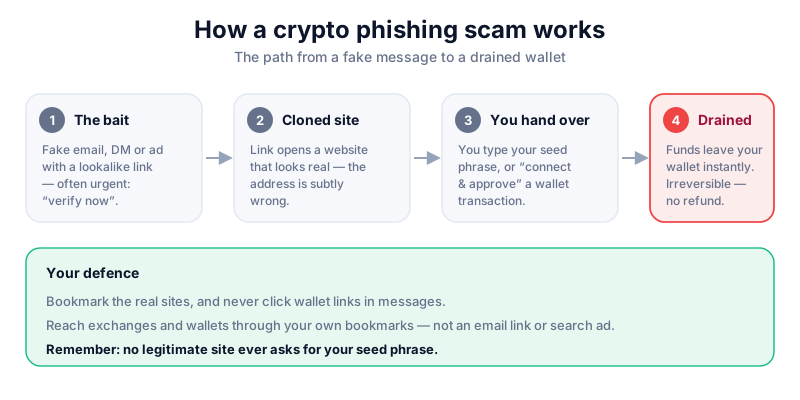
A phishing attack impersonates something you trust — an exchange, a wallet, a popular project — to get you to act. The message usually arrives by email, text, social media DM, or a sponsored search result, and it carries a link to a fake site that looks almost identical to the real one.
Once you're on the fake site, one of two things happens. Either you type in your login details or seed phrase and hand them straight to the attacker, or you connect your wallet and approve a transaction that quietly drains your funds. The second type — a 'wallet drainer' — is now the most common and the most dangerous.
- Fake login pages harvest your username and password.
- Fake seed-phrase prompts ask you to 'restore' or 'validate' your wallet.
- Malicious approvals trick you into signing a transaction that gives the attacker permission to move your tokens.
Red flags to watch for
Phishing relies on you reacting quickly instead of checking carefully. These signals should make you stop:
- Urgency: 'Your account will be locked', 'Verify within 24 hours', 'Suspicious login detected'.
- A link whose address is subtly wrong — an extra letter, a different ending, or a hyphen that shouldn't be there.
- Any request for your seed phrase, private key, or full password.
- Unexpected 'airdrop', 'refund' or 'reward' messages with a claim link.
- A wallet pop-up asking you to approve something you didn't initiate.
No one needs your seed phrase
No exchange, wallet, support agent or 'verification' tool will ever ask for your 12–24 word seed phrase or private key. Anyone who does is trying to steal from you — full stop. Never type it into a website.
How to defend yourself
Good habits beat clever attacks. Build these into your routine and most phishing simply bounces off you:
- Type addresses yourself or use your own bookmarks. Never reach an exchange or wallet through an email link or search ad.
- Check the URL character by character before connecting a wallet or logging in.
- Turn on app-based two-factor authentication so a stolen password alone isn't enough.
- Review wallet approvals and revoke ones you no longer use with a trusted approval-checker tool.
- Slow down. Legitimate services don't punish you for taking five minutes to verify.
A hardware wallet like the Ledger Nano X makes you confirm every transaction on the device's own screen, so a phishing site can't sign anything behind your back. Read our full review before you buy, and only buy direct from the manufacturer.
If you think you've been phished
Act fast. If you entered an exchange password, change it immediately and enable two-factor authentication. If you connected a wallet, move any remaining funds to a fresh wallet with a brand-new seed phrase and revoke the malicious approval. If you typed your seed phrase into a site, assume that wallet is compromised forever — create a new one and never reuse the old phrase.
Then learn the wider pattern in our guide to avoiding crypto scams, and read about fake support scams, which often follow a phishing attempt.
Key takeaways
- Phishing impersonates a service you trust to steal logins, seed phrases or approvals.
- Urgency and slightly-wrong links are the biggest tell-tale signs.
- No legitimate service ever asks for your seed phrase or private key.
- Reach sites through your own bookmarks, and confirm transactions on a hardware wallet.
Frequently asked questions
How do scammers get my email or phone number?
Usually from leaked databases, past data breaches, or public social-media profiles. Receiving a phishing message doesn't mean your wallet is compromised — but never click the link.
Can I recover funds lost to a phishing scam?
Crypto transactions are irreversible, so recovery is rare. Be especially wary of 'recovery experts' who contact you afterwards — they are almost always a second scam.
Is it safe to click a link just to look?
It's risky. Wallet-drainer sites can prompt malicious approvals the moment you connect. If you must check something, type the official address yourself instead.
Keep reading
How to Avoid Crypto Scams: The Cornerstone Safety Guide
The common crypto scams — fake support, phishing, giveaways, romance and rug pulls — and the simple habits tha
Fake Support Scams: How Impersonators Drain Crypto Wallets
Scammers posing as exchange or wallet 'support' are one of crypto's most common cons. Here's how the trick wor
Crypto Giveaway Scams: Why 'Send 1, Get 2 Back' Is a Trap
Fake giveaways and 'double your crypto' offers use famous names and fake live streams to steal funds. Here's h