SIM-Swap Attacks Explained
A SIM-swap attack is when a criminal convinces your mobile carrier to move your phone number onto a SIM card they control. Once they have your number, they receive your calls and texts — including the SMS security codes that protect your email and crypto accounts. This guide explains the attack and the concrete steps that shut it down.
The 20-second version
Your phone number is a weak link. If an attacker can take it over, SMS two-factor codes protect nothing. The fixes: use an authenticator app or hardware key instead of SMS, add a carrier PIN or port-freeze, and never store crypto behind SMS-only security.
What a SIM swap is
Carriers can transfer your number to a new SIM when you legitimately upgrade your phone. SIM-swap fraudsters abuse that process. Using personal details gathered from data breaches, phishing, or social media, they impersonate you and persuade the carrier — or a bribed insider — to port your number to their SIM.
The moment the swap completes, your phone loses service and the attacker's phone starts receiving your texts and calls. They then trigger 'forgot password' and SMS-code flows on your accounts. Crypto users have lost significant sums this way because so many exchanges and email providers still default to SMS verification.
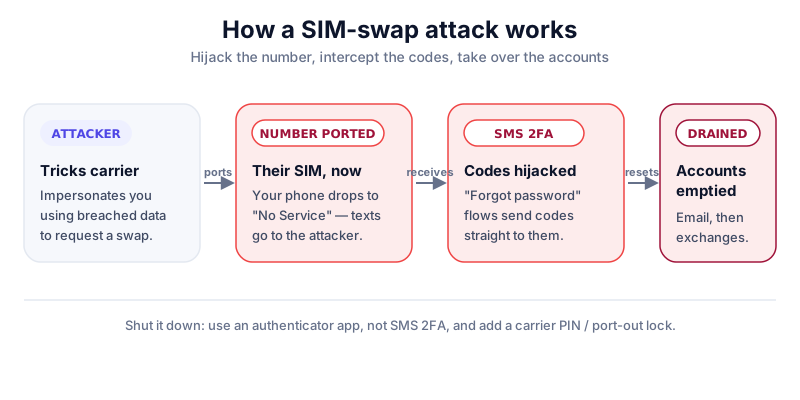
Warning signs and how it unfolds
- Your phone suddenly shows 'No Service' or 'SOS only' for no reason.
- You stop receiving calls and texts unexpectedly.
- You get emails about password resets or logins you didn't start.
- You're locked out of email, then exchange or wallet accounts in quick succession.
Minutes matter
If your phone loses service unexpectedly, treat it as an emergency. Contact your carrier from another phone immediately and lock down your most important accounts (email first) before the attacker reaches your crypto.
How to protect yourself
- Replace SMS two-factor with an authenticator app (TOTP) or, better, a hardware security key on every account that supports it.
- Ask your carrier to add a port-out PIN or number-lock/port-freeze to your account.
- Remove your phone number as a recovery method where you can; use an authenticator or backup codes instead.
- Lock down the email tied to your crypto accounts most of all — it's the master key to everything else.
- Keep long-term crypto in self-custody on a hardware wallet, so an account takeover alone can't move your funds.
Self-custody means no carrier and no SMS code stands between you and your coins. A hardware wallet like the Ledger Nano X keeps keys offline — read our review first.
If you're hit
- Call your carrier from another line to reverse the swap and re-secure the account.
- Reset passwords from a clean device, starting with email, then exchanges and wallets.
- Move exchange funds to self-custody and revoke active sessions and API keys.
- Report it to your carrier and the relevant authorities; preserve evidence for any claim.
Reduce your exposure now
The less personal data is floating around, the harder you are to impersonate. Limit what you share publicly, and never confirm account details to inbound callers. See how to avoid crypto scams.
Key takeaways
- A SIM swap hijacks your number to intercept SMS codes and reset passwords.
- Stop relying on SMS two-factor; use an authenticator app or hardware key.
- Add a carrier port-out PIN and secure your email above all else.
- Self-custody keeps your crypto out of reach of an account takeover.
Frequently asked questions
Is SMS two-factor better than nothing?
It's better than no second factor, but it's the weakest option because of SIM swapping. Move to an authenticator app or hardware key wherever possible, especially for crypto and email.
Can a SIM swap drain a hardware wallet?
Not directly. Your hardware wallet keys never touch your phone number. The risk is to accounts protected by SMS, like exchanges, which is why self-custody adds real protection.
How do attackers know my number and details?
Usually from data breaches, phishing, and oversharing on social media. Minimising your public footprint makes you a harder target.
Keep reading
How to Avoid Crypto Scams: The Cornerstone Safety Guide
The common crypto scams — fake support, phishing, giveaways, romance and rug pulls — and the simple habits tha
Wallet Drainer Scams Explained
How wallet-drainer scams trick you into signing a malicious transaction that empties your wallet in seconds —
How to Store Bitcoin Safely (Step by Step)
Keep your Bitcoin safe from hackers and mistakes: hot vs cold wallets, hardware wallets, seed-phrase backups,