What Is a Watch-Only Wallet? (Track Crypto Without Risk)
A watch-only wallet is one of the most underrated security tools in crypto: it lets you see a wallet's balance and activity without ever holding the private keys. That means you can check on your cold storage, track an address, or monitor a portfolio with zero risk of those funds being moved. Here's how it works and when to use one.
The 20-second version
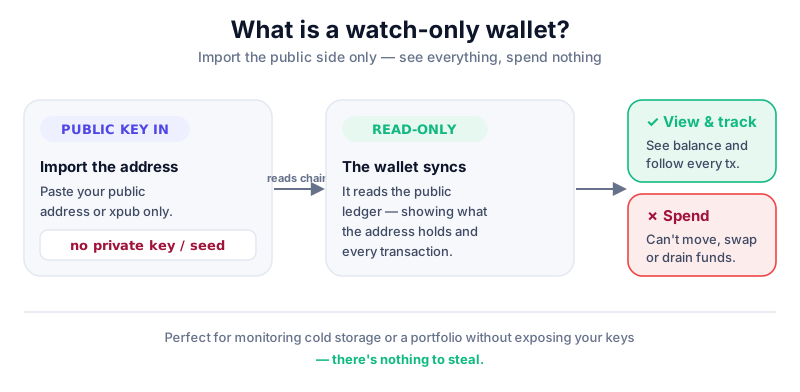
A watch-only wallet imports only a public address or extended public key — never the private key or seed phrase. You can view balances and incoming and outgoing transactions, but you cannot spend. It's read-only by design, which makes it impossible to drain.
What a watch-only wallet actually is
Every crypto wallet has two halves: a public key (an address, safe to share, like an account number) and a private key (the secret that authorises spending). A normal wallet holds both. A watch-only wallet holds only the public side.
Because the public address is already visible to everyone on the blockchain, importing it into a watch-only wallet reveals nothing secret. The wallet simply reads the public ledger and shows you what that address holds and what's flowed through it.
Public keys are meant to be shared
Sharing a public address is how people send you crypto. A watch-only wallet uses only that public information, so there's no key to steal and nothing to drain.
How you set one up
Most modern wallet apps and blockchain explorers support a watch-only mode. The exact steps vary, but the principle is the same everywhere.
- Open your wallet app and choose 'Add account', then look for an option like 'Watch-only', 'View-only', or 'Track address'.
- Paste in the public address, or for a full wallet, the extended public key (xpub) that lets it see every address in that wallet.
- The wallet syncs with the blockchain and displays balances and history — but never asks for, and never receives, your private key.
- Confirm that no 'Send' function is available. If the app ever prompts you for a seed phrase to 'finish setup', stop — that defeats the purpose.
Never import a private key here
The entire point of watch-only mode is that no spending key is involved. No legitimate watch-only setup needs your seed phrase. If a tool asks for it, it's not watch-only — it's a trap.
Why watch-only wallets are useful
- Monitor cold storage safely. Check your hardware-wallet balance on your phone without ever plugging in the device or exposing your keys.
- Track without temptation or risk. A view-only portfolio on a daily-use phone can't be drained even if that phone is compromised.
- Watch a public or shared address. Useful for monitoring a treasury, a donation address, or simply learning how transactions appear on-chain.
- Plan transactions in advance. Some setups let you build an unsigned transaction in the watch-only wallet, then sign it separately on an offline device.
The limits to understand
A watch-only wallet is deliberately limited, and that's a feature, not a bug. But it's worth being clear about what it can't do.
- You cannot spend, swap, or move funds from it — that always requires the private key on a separate device.
- It does nothing to protect the wallet that *does* hold the keys; that still needs proper cold storage.
- It exposes your address activity to whatever app you use, so pick a reputable one and mind your privacy.
- It won't alert you to problems unless you actually check it — pair it with the habit of reviewing your holdings.
Think of it as a window into your wallet, not a door. It's especially handy if you're recovering from a scare and want to keep an eye on funds — see our calm guide on recovering a hacked wallet.
The safest home for anything you’re not actively trading is a hardware wallet — your private keys stay offline, out of reach of hackers and exchange failures. The Ledger Nano S Plus is the value pick we’d hand a beginner.
Key takeaways
- A watch-only wallet imports only a public address or xpub — never the private key.
- It lets you monitor balances and transactions with zero risk of funds being moved.
- It's ideal for keeping an eye on cold storage without exposing your hardware wallet.
- It can't spend, and it doesn't replace proper key security for the real wallet.
Frequently asked questions
Can someone steal my crypto from a watch-only wallet?
No. A watch-only wallet contains no private key, so there's nothing to authorise a transfer. Even if the device running it is hacked, the funds can't be moved without the separate spending key.
What's the difference between a public key and a private key?
The public key (your address) is safe to share and is how people send you crypto. The private key, derived from your seed phrase, authorises spending and must stay secret. Watch-only wallets use only the public side.
Do I still need a hardware wallet if I have a watch-only wallet?
Yes. The watch-only wallet only lets you observe. Your actual coins are controlled by the wallet that holds the keys, which for larger amounts should be a hardware wallet in cold storage.
Keep reading
Hot vs Cold Wallets: What's the Difference?
A plain-English hot vs cold wallets comparison — how each works, the security trade-offs, and how to combine b
What Is a Seed Phrase? (And Why You Must Never Share It)
A plain-English guide to seed phrases: what they are, how they back up your crypto wallet, how to store one sa
How to Store Bitcoin Safely (Step by Step)
Keep your Bitcoin safe from hackers and mistakes: hot vs cold wallets, hardware wallets, seed-phrase backups,