Hot vs Cold Wallets: What's the Difference?
Every crypto wallet is either 'hot' (online) or 'cold' (offline), and that one distinction decides how exposed your coins are to hackers. It's one of the most important ideas in keeping crypto safe, and happily it's also one of the simplest. This guide explains both kinds, the trade-offs between them, and how most sensible people end up using a mix of the two.
The 20-second version
A hot wallet is connected to the internet — convenient but more exposed. A cold wallet keeps your keys offline — far safer but less convenient. Use a hot wallet for spending money and a cold wallet for savings. The keys, not the coins, are what you're really protecting.
First: it's all about the keys
Here's the idea that makes everything else click: your coins don't actually live 'in' your wallet. They live on the blockchain, the shared public ledger. What a wallet really stores are the private keys — the secret numbers that prove the coins are yours and let you spend them. A wallet is less like a purse full of cash and more like the only set of keys to a vault that everyone can see but only you can open.
That reframing is why 'hot' and 'cold' matter so much. The terms don't describe the coins at all — they describe whether your private keys ever touch an internet-connected device. Keys that go online can, in principle, be stolen remotely. Keys that never go online can't. Everything below flows from that single fact.
Guard your seed phrase
Whether hot or cold, your wallet is backed up by a seed phrase of 12–24 words. Anyone who has it controls your funds, full stop. No legitimate app, exchange or support agent will ever ask for it — never type it into a website, never enter it into a pop-up, and never share it with anyone, ever.
Hot vs cold at a glance
| Feature | Hot wallet | Cold wallet |
|---|---|---|
| Connection | Online (phone, browser, app) | Offline (hardware device, paper) |
| Security | More exposed to hacks | Very high — keys stay offline |
| Convenience | Instant, easy to use | Slower, extra steps to sign |
| Cost | Usually free | Buy a device (~£50–£150) |
| Examples | MetaMask, Trust Wallet, Phantom | Ledger, Trezor |
| Best for | Spending, small amounts, DeFi | Long-term savings, large amounts |
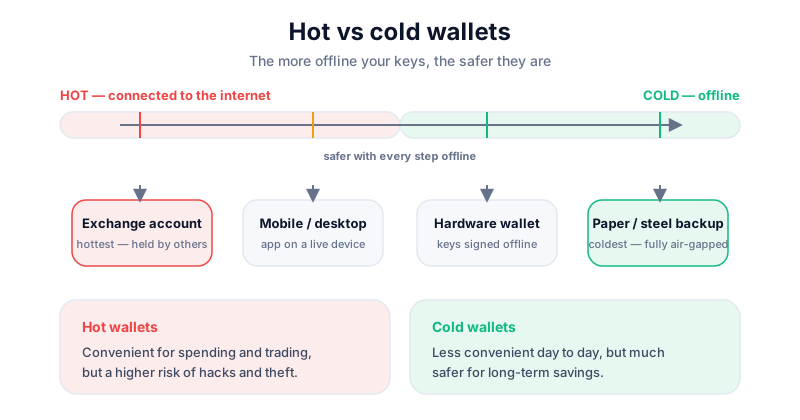
Hot wallets: convenient, more exposed
Hot wallets are apps on your phone or browser — like MetaMask, Trust Wallet and Phantom. They're free, instant, and ideal for everyday use and for connecting to apps. Setting one up takes a couple of minutes, and you can be swapping or sending in moments. For getting started and for small, active balances, they're exactly the right tool.
The trade-off is right there in the name. Because the keys live on an internet-connected device, they're reachable — at least in theory — by anything that can reach that device. Malware on your phone, a convincing phishing site, a malicious browser extension, or a dodgy 'approve' prompt can all put your funds at risk. None of these are exotic; they're the bread and butter of crypto theft. The wallet itself isn't the weak point so much as the busy, connected device it lives on.
- Great for: small amounts, day-to-day spending, and using DeFi and dApps where you need to interact quickly.
- Watch out for: fake websites, copycat browser extensions, and 'approve' prompts that quietly hand over permission to drain your wallet.
- Rule of thumb: keep only what you'd be genuinely relaxed about losing in a hot wallet — treat it like the cash in your pocket, not your savings.
Cold wallets: safer, less convenient
Cold wallets keep your keys completely offline, out of reach of anything online. The most popular and practical form is a hardware wallet — a small dedicated device like a Ledger or Trezor that signs transactions internally, so your keys never leave it and never touch your computer. The device does the secret part; your computer only ever sees the finished, signed transaction.
This is what makes cold storage so robust. Even if your PC is riddled with malware, your funds stay safe, because every transaction has to be checked and physically confirmed by pressing a button on the device in your hand. A remote attacker can't press that button. The catch is convenience: you need the device with you, and each transaction takes a few extra steps. For long-term holdings, that minor friction is a price well worth paying. Compare the leading devices in our Ledger vs Trezor guide.
A hardware wallet keeps your keys offline and out of reach of hackers. The Ledger Nano X is our pick for most people. If you buy through our link we may earn a commission at no cost to you — it never changes our verdicts. Buy direct from the maker, never second-hand.
The verdict: use both
You don't have to pick a side. The most sensible setup uses each wallet for what it's best at, the same way you'd keep some cash in your pocket and the rest in the bank.
Use a hot wallet for…
Spending money, experimenting with apps, and amounts you'd be relaxed about losing. Think of it like the cash in your pocket: handy, quick, and not where you keep your life savings. If it's compromised, it stings but it doesn't ruin you.
Use a cold wallet for…
Savings and any holding you'd be genuinely upset to lose. Think of it like a safe at home — a little effort to open, which is exactly the point. Most experienced users keep a small float hot for day-to-day use and the bulk cold for the long term, getting the convenience of one and the security of the other.
A safe pairing
You can connect a hot wallet like MetaMask or Phantom to a hardware wallet, so you keep the familiar app interface while the keys themselves stay safely offline. Every transaction still needs a physical button press on the device. It's a popular way to enjoy convenience and cold-storage safety at the same time.
Key takeaways
- Hot wallets are online — convenient but more exposed to hacks and phishing.
- Cold wallets keep keys offline — far safer for larger, longer-term holdings.
- Use a hot wallet for spending and a cold wallet for savings, like a pocket and a safe.
- Either way, protect your seed phrase and never share it with anyone.
Frequently asked questions
Do I need a cold wallet?
For small, everyday amounts a reputable hot wallet is perfectly fine. But for anything you'd be genuinely upset to lose, a cold (hardware) wallet is well worth the one-off cost — it takes your keys off the internet entirely, which is the single biggest upgrade you can make to your security.
Is a hardware wallet a cold wallet?
Yes. A hardware wallet keeps your private keys offline on a dedicated device that signs transactions internally, which is the defining feature of cold storage. The keys never touch your internet-connected computer or phone.
Can I use a hot and cold wallet together?
Absolutely — and most experienced users do. Keep a small spending balance in a hot wallet and the bulk of your holdings in cold storage. You can even connect a hot wallet's interface to a hardware wallet, getting the familiar app while the keys stay offline.
Keep reading
Ledger vs Trezor: Which Hardware Wallet Should You Choose?
A balanced Ledger vs Trezor comparison — security models, open-source firmware, coin support, ease of use and
How to Store Bitcoin Safely (Step by Step)
Keep your Bitcoin safe from hackers and mistakes: hot vs cold wallets, hardware wallets, seed-phrase backups,
What Is a Seed Phrase? (And Why You Must Never Share It)
A plain-English guide to seed phrases: what they are, how they back up your crypto wallet, how to store one sa