How to Buy Chainlink (LINK) Safely: Step by Step
If you've read what Chainlink is and decided you want to own some LINK, this guide shows the safe way to do it — choosing a trustworthy exchange, getting set up, placing your first order, and moving your coins somewhere secure.
The 20-second version
Pick a reputable exchange, verify your identity, deposit funds, and buy LINK. Then move anything you want to hold long-term off the exchange into your own wallet. Only spend what you can afford to lose.
Before you buy
Buying LINK is straightforward, but the most important work happens before you spend a penny. Make sure you understand what you're buying and that you're using money you can genuinely afford to lose.
Read this first
LINK's price can swing sharply in either direction. Never invest money you need, and never borrow to buy crypto. This is education, not financial advice — we don't tell you whether to buy.
How to buy LINK, step by step
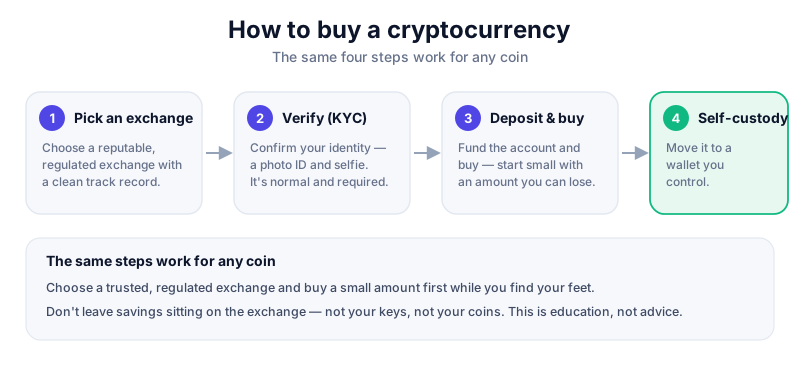
- Choose a reputable exchange that lists LINK, such as Coinbase, Kraken or Binance. Check it operates legally where you live.
- Create an account and complete identity verification (KYC). This is normal and required by regulated exchanges.
- Turn on two-factor authentication (2FA) using an authenticator app, not SMS, to protect your account.
- Deposit funds by bank transfer or card. Bank transfers usually carry lower fees than card payments.
- Search for LINK and place your order. A 'market' order buys at the current price; a 'limit' order lets you set the price you're willing to pay.
- Review the fees and confirm. Then decide whether to keep small amounts on the exchange or move LINK to your own wallet.
Coinbase is one of the easier exchanges for first-time buyers, with LINK widely supported. Compare options in our exchange reviews — and remember fees and features vary by country.
After you buy: keep it safe
Leaving coins on an exchange is convenient but means the exchange holds your keys — and exchanges can be hacked or freeze withdrawals. For anything you'd be upset to lose, move it into a wallet you control. We walk through this in how to store LINK safely.
Avoid common scams
Ignore anyone promising guaranteed returns, 'free' LINK giveaways, or help over DM. Read how to avoid crypto scams and never share your seed phrase with anyone.
Watch the fees
- Trading fees are charged when you buy or sell — compare exchanges.
- Card deposits usually cost more than bank transfers.
- Network fees apply when you move LINK to your own wallet.
- Spread — the gap between buy and sell price — is an easily missed cost on 'simple' buy buttons.
Key takeaways
- Use a reputable, regulated exchange and turn on app-based 2FA.
- Bank transfers usually beat card payments on fees.
- Move long-term holdings off the exchange into your own wallet.
- LINK is volatile — only ever risk what you can afford to lose.
Frequently asked questions
How much LINK do I need to buy?
You don't need a whole token. LINK is divisible, so you can buy a small fraction with a modest amount of money.
Is it safe to leave LINK on an exchange?
For small sums or active trading it's convenient, but the exchange controls the keys. For larger holdings, self-custody in your own wallet is safer.
Which exchange is best for buying LINK?
There's no single best — it depends on your country, fees, and features. Stick to well-established, regulated platforms and compare them in our reviews.
Keep reading
What Is Chainlink (LINK)? A Plain-English Guide
A beginner-friendly explanation of Chainlink and the LINK token: what it does, how its oracle network works, a
How to Store Chainlink (LINK) Safely
Keep your LINK safe: hot vs cold wallets, hardware wallets, seed-phrase backups, and the simple rules that pro
How to Avoid Crypto Scams: The Cornerstone Safety Guide
The common crypto scams — fake support, phishing, giveaways, romance and rug pulls — and the simple habits tha