How to Send Crypto (Step by Step)
Sending crypto is just copying an address and confirming a transaction — but because transfers are irreversible, small slips can be expensive. This guide walks through how to send crypto safely, why the network matters as much as the address, and the one habit that catches almost every mistake before it costs you.
The 20-second version
To send crypto you need the recipient's address and the correct network. Paste the address (never type it), double-check the first and last characters, send a small test amount first, then send the rest. Transactions can't be reversed.
What you need before sending
Every send needs three things: the recipient's address, the network the address lives on, and enough of the coin (plus a little extra for the fee) in your wallet. An address is a long string of letters and numbers — your wallet shows it as text and usually as a QR code.
The network matters as much as the address. The same token can exist on several blockchains — for example, a stablecoin like USDC runs on Ethereum, Solana and others. Sending on the wrong network is one of the most common ways people lose funds.
How to send crypto, step by step
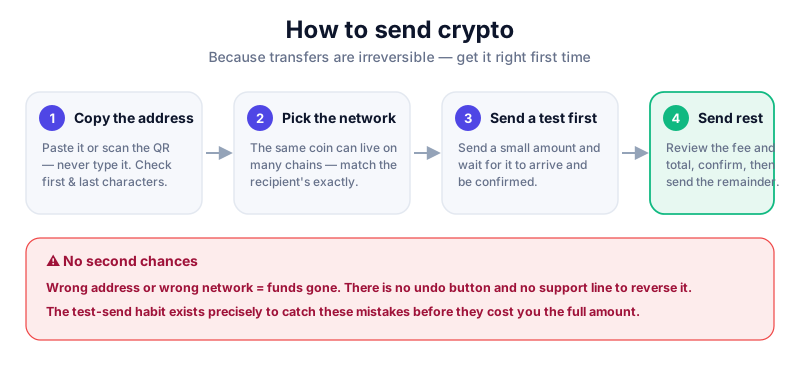
- Get the recipient's address. Ask them to copy it from their wallet's 'Receive' screen, or scan their QR code.
- In your own wallet, choose the coin you're sending and tap 'Send'.
- Paste the address — never type it by hand. Confirm the first four and last four characters match what the recipient sent.
- Select the correct network. It must match the network the recipient gave you exactly.
- Enter a small test amount first, send it, and wait for it to arrive and be confirmed.
- Once confirmed, send the remaining amount. Review the network fee and final total before you press confirm.
A hardware wallet makes you physically confirm every transaction on the device screen, so malware can't swap the address behind your back. The Ledger Nano X is our top pick — read our full review first.
Fees and confirmations
Every transaction pays a network fee to the people securing the chain — not to your wallet provider. Fees rise when a network is busy and fall when it's quiet. Bitcoin and Ethereum fees vary the most; networks like Solana are usually cheap.
- Fee is taken on top of the amount you send — make sure you leave enough to cover it.
- Confirmations are blocks added after your transaction. More confirmations means it's more final.
- Pending transactions can take seconds or, on a congested chain, much longer.
Mistakes that cost real money
Sends are irreversible
There is no 'undo' and no support line that can claw back a crypto transfer. If you send to a wrong or wrong-network address, the funds are almost always gone for good. The test transaction habit exists precisely to prevent this.
- Typing an address by hand instead of pasting or scanning it.
- Picking the wrong network for the destination address.
- Trusting a pasted address blindly — clipboard-hijacking malware can swap it.
- Sending your whole balance with nothing left for the fee.
Key takeaways
- Crypto sends are irreversible — there is no undo button.
- Always paste or scan the address and verify the first and last characters.
- The network must match the destination address exactly.
- Send a small test amount first, then send the rest.
Frequently asked questions
Can I cancel a crypto transaction?
Generally no. Once a transaction is broadcast and confirmed it's permanent. That's why checking the address and network — and doing a test send — matters so much.
Why does my send need a fee?
The fee pays the network that processes and secures your transaction, not your wallet app. Busy networks cost more; quiet ones cost less.
What if I sent to the wrong network?
Recovery is usually impossible and, where technically possible, complex and risky. The safest approach is to never let it happen by verifying the network before you confirm.
Keep reading
How to Receive Crypto (Step by Step)
How to receive cryptocurrency safely: finding your receive address, sharing it the right way, matching network
How to Do a Test Transaction (and Avoid Costly Mistakes)
Why a small test transaction is the simplest habit in crypto, when to use one, and how to do it step by step b
How to Read a Block Explorer
A beginner's guide to block explorers: how to look up a transaction, read confirmations and fees, check an add