How to Set Up Coinbase Wallet (Step by Step)
Coinbase Wallet is easy to confuse with the Coinbase exchange, but they're different things. The exchange holds your crypto for you; Coinbase Wallet is a separate self-custody app where you hold the keys yourself. This guide covers setting it up safely and understanding the responsibility that comes with it.
The 20-second version
Coinbase Wallet is self-custody and separate from the Coinbase exchange. Install it from an official store, then write your recovery phrase on paper and keep it offline. You alone control the funds — no one can recover them if the phrase is lost, and no one should ever ask for it.
Wallet vs exchange: know the difference
On the Coinbase exchange, Coinbase holds the keys and can help if you forget a password. Coinbase Wallet is the opposite: you hold the keys, you get a recovery phrase, and there is no password reset for your funds. That self-custody is powerful — but it puts the backup squarely on you.
- Exchange account: custodial, recoverable, good for buying and small balances.
- Coinbase Wallet: self-custody, you hold the keys, good for using Web3 apps.
Step 1: Install Coinbase Wallet safely
Download Coinbase Wallet only from the Apple App Store, Google Play, or the official browser-extension link on coinbase.com. Confirm the publisher is 'Coinbase', and ignore search ads or messaged links — fake wallet apps exist purely to capture your recovery phrase.
Check the publisher
Verify the developer name and review count before installing. If you reached the download via an ad, a DM, or a QR code from someone, stop and go to the official source yourself.
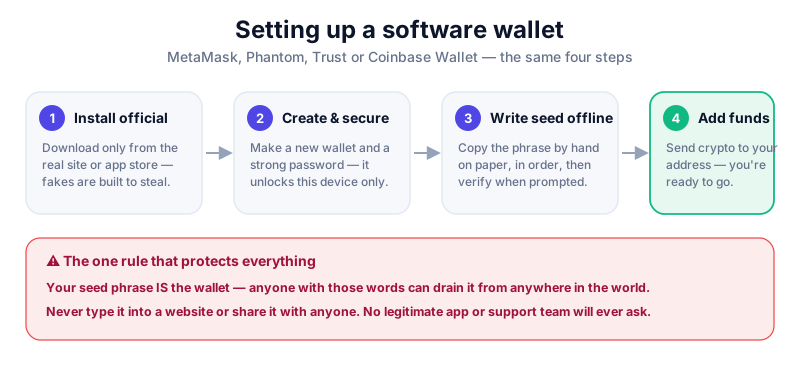
Step 2: Create and back up your wallet
- Open Coinbase Wallet and choose to create a new wallet.
- Set a passcode or biometric lock for the app on this device.
- When the app reveals your recovery phrase, write it on paper by hand, in order.
- Confirm the phrase when prompted, then store the paper offline — ideally two copies in two locations.
- Never screenshot the phrase, save it to cloud backup, or type it into any website.
Your recovery phrase is the master key
Anyone with your recovery phrase can take everything in the wallet. Coinbase support will never ask for it, and no legitimate service ever will. If a site or 'agent' asks you to enter it, it's a scam — stop immediately.
Step 3: Move funds and connect carefully
You can move crypto from the Coinbase exchange to Coinbase Wallet (and back), and use the wallet to connect to DeFi apps and NFT marketplaces. Always select the correct network, send a small test amount first, and review every connection and signing request before approving it.
- Double-check the address and network on every transfer.
- Treat unexpected tokens or NFTs that appear in your wallet as suspicious.
- For larger holdings, keep most funds in cold storage such as a hardware wallet.
A self-custody app is great for everyday use, but serious holdings belong offline. The Ledger Nano X keeps your keys on a secure chip — read our review first.
Key takeaways
- Coinbase Wallet is self-custody and separate from the Coinbase exchange.
- Install it only from an official app store or coinbase.com.
- Write your recovery phrase on paper and store it offline.
- No legitimate service will ever ask for your recovery phrase.
Frequently asked questions
Is Coinbase Wallet the same as my Coinbase account?
No. Your Coinbase exchange account is custodial — Coinbase holds the keys. Coinbase Wallet is a separate self-custody app where you hold the keys and get a recovery phrase.
Do I need a Coinbase exchange account to use the wallet?
No. Coinbase Wallet works on its own. Having an exchange account just makes it easier to move funds between the two.
What if I lose my recovery phrase?
With a self-custody wallet, no one can recover your funds without it — not even Coinbase. That's exactly why you must back up the phrase on paper and keep it safe and secret.
Keep reading
How to Set Up MetaMask (Step by Step)
A beginner's guide to setting up the MetaMask wallet safely: install the extension, back up your seed phrase,
How to Set Up Trust Wallet (Step by Step)
Set up the Trust Wallet mobile app safely: download it from the right place, back up your recovery phrase, and
What Is a Seed Phrase? (And Why You Must Never Share It)
A plain-English guide to seed phrases: what they are, how they back up your crypto wallet, how to store one sa