How to Store PulseChain (PLS) Safely
You've bought some PLS — now where does it live? Storing PLS safely means setting up a wallet correctly, adding PulseChain as a custom network, and, for anything you'd be genuinely upset to lose, pairing it with a hardware wallet. This lesson walks through it step by step, because getting storage right is the difference between owning your coins and one day discovering somebody else does. It's the least glamorous lesson in the course and quietly the most important.
The 20-second version
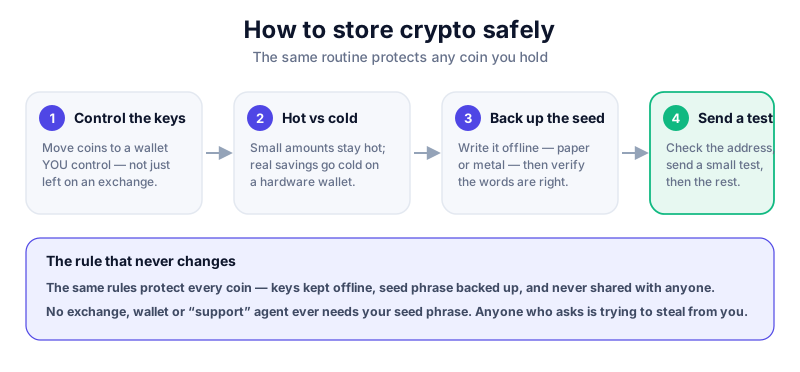
PLS lives in an Ethereum-style wallet like MetaMask, with PulseChain added as a custom network. For real holdings, connect a hardware wallet so your keys stay offline. Write your seed phrase on paper, keep it offline, and never share it with anyone — no exceptions, no 'support agents', ever.
It's all about the keys
Here's the mental model that fixes everything else. You don't really 'store' PLS — there are no coins sitting in a wallet like cash in a purse. The coins live on the blockchain; what you store are the keys that prove they're yours and let you move them. Whoever controls the keys controls the coins. That's why 'not your keys, not your coins' matters just as much on PulseChain as it does on Bitcoin or Ethereum.
It helps to separate two things people muddle. Your wallet app (like MetaMask) is just a viewer and a remote control — it shows your balance and lets you sign instructions. The keys are the real thing, and they're recreated from your seed phrase. Lose the app and you can reinstall it and restore from the seed phrase. Lose or leak the seed phrase, and the wallet app can't save you — whoever has those words has your coins, on any device, anywhere in the world.
Think of your seed phrase as the master key to a safe deposit box that exists in millions of identical copies worldwide. Anyone holding that key can open the box, anywhere, no ID required. That's brilliantly convenient and brutally unforgiving — there's no bank to call and no 'forgot password' link. The whole of wallet safety flows from protecting that one key, which is why we keep hammering it: nearly every horror story you'll read traces back to a seed phrase that ended up somewhere it shouldn't.
Never share your seed phrase
Your seed phrase (usually 12–24 words) can restore your entire wallet on any device. No wallet, exchange, bridge or 'support agent' will ever need it — legitimate ones literally cannot use it. Anyone who asks for it is trying to steal from you. Type it nowhere; tell it to no one.
Adding PulseChain to MetaMask
Because PulseChain is EVM-compatible (remember lesson two — same engine as Ethereum), an Ethereum wallet such as MetaMask works with it. You just add PulseChain as a custom network, which is a bit like adding a new radio station by typing in its frequency: the radio already works, you're just telling it where to tune. The single biggest risk in this whole process is using wrong or malicious network details, so every value must come from an official source.
- Install MetaMask only from the official site or your browser's official extension store. Let it generate a fresh seed phrase and write it on paper — never type it into anything but MetaMask itself.
- Open the network selector and choose to add a network manually.
- Enter PulseChain's network details — network name, RPC URL, chain ID, currency symbol (PLS), and block explorer — but copy these only from PulseChain's official documentation, never from an ad, a DM, or a random search result.
- Save, then switch to the PulseChain network. Your PLS balance will now show up.
- Bookmark every official source you used, so you never have to search for them again and risk landing on a fake.
Why so much fuss about one URL? Because the 'RPC URL' is the address your wallet talks to in order to see the network and send transactions. Point it at a malicious server and a scammer can show you fake balances, feed you doctored transactions to sign, or nudge you toward approving something you'd never agree to if you saw it clearly. It's the digital equivalent of getting directions from a stranger who's quietly sending you the wrong way. Get the details from the official docs, cross-check them, and that whole category of attack closes off.
Verify RPC details independently
Fake 'add PulseChain in one click' pages exist specifically to trick you into using malicious networks or approving bad transactions. Cross-check the network details against more than one official reference before you save — two minutes of paranoia beats a drained wallet.
Pairing a hardware wallet
A browser wallet on its own is a hot wallet — connected to the internet, and therefore reachable by anything that compromises your computer. That's fine for small, active amounts, but for anything serious you want your keys somewhere the internet can't touch. That's what a hardware wallet does: it pairs with MetaMask but keeps your private keys on a dedicated device, so they never leave it even when you sign a PulseChain transaction.
The way it works in practice is neat. When you want to send PLS, MetaMask builds the transaction and passes it to the device. The device shows you the details on its own little screen, you press a physical button to approve, and only the signed result comes back — the keys themselves never leave the chip and never touch your internet-connected computer. So even if your laptop is riddled with malware, the attacker can't sign anything without the device in your hand physically confirming it. That's the whole point: it moves the one irreplaceable secret somewhere a hacked computer simply can't reach.
- Hot wallet (MetaMask alone) — convenient, fine for small, active amounts you're using day to day.
- Cold storage (hardware wallet + MetaMask) — the safer home for any holding you'd be upset to lose. You still use MetaMask's interface; the device just signs.
- Buy any hardware wallet direct from the manufacturer — never second-hand, never from a marketplace seller, which risks a tampered device pre-loaded with someone else's keys.
The Ledger Nano X connects to MetaMask and keeps your keys on a secure chip, so PulseChain transactions are signed offline and your seed phrase never touches your computer. Buy direct from Ledger only. We may earn a commission at no cost to you — it never changes our verdicts. Read our full review first.
Common mistakes to avoid
Most people who lose PLS don't get out-hacked by a genius — they trip over one of a handful of avoidable mistakes. Knowing them in advance is half the battle, because once you've seen the trap you tend not to walk into it:
- Adding network details from an unofficial 'add PulseChain' page instead of the official docs — the classic way a malicious network sneaks in.
- Storing your seed phrase as a photo, screenshot, or note on your phone, where any app or cloud backup could leak it.
- Approving token permissions on sites you don't fully trust — and never revisiting them. Revoke unused approvals periodically.
- Buying a 'pre-set-up' wallet that arrives with a seed phrase already written down. That is *always* a scam — the seller knows the words too.
That third one — token approvals — deserves a sentence on its own, because it's subtle. When you use a swap or a bridge, you often grant a smart contract permission to move certain tokens on your behalf. Handy, but those permissions can linger long after you've finished, and a contract that later turns malicious (or was dodgy all along) can use them. Treat approvals like spare keys you've handed out: useful at the time, but worth collecting back in. Most block explorers and wallet tools let you review and revoke them, and a periodic clear-out is cheap insurance.
Slow down when you're being rushed
Scammers manufacture urgency on purpose, because panic switches off your judgement. Any message pushing you to 'verify', 'migrate' or 'rescue' your PLS right now is a red flag by default. Stop, breathe, and check independently. See how to avoid crypto scams.
Where this leads next
With a properly set-up wallet — ideally backed by a hardware device — you're in control of your own PLS. The next lesson tackles one of the riskiest things you can do with that wallet: bridging, or moving assets between Ethereum and PulseChain. The good habits you've just learned about seed phrases, official links and hardware signing are exactly what keep you safe there too — bridging just raises the stakes, so the same discipline matters even more.
Key takeaways
- You're protecting keys, not coins — guard your seed phrase above absolutely everything else.
- PLS uses an Ethereum-style wallet; add PulseChain as a custom network from official docs only.
- Pair MetaMask with a hardware wallet for anything you'd be upset to lose.
- Verify network details, buy hardware direct from the maker, and never share your seed phrase.
Frequently asked questions
Can I use MetaMask for PulseChain?
Yes. MetaMask supports PulseChain once you add it as a custom network. Just be careful to copy the network details only from official sources, never from an ad or a one-click 'helper' page.
Does my Ledger or Trezor support PLS?
Hardware wallets that work with EVM chains via MetaMask can sign PulseChain transactions. Set the device up yourself from scratch and buy it direct from the manufacturer.
Is it safer to keep PLS on an exchange?
An exchange holds the keys for you, so it isn't true self-custody, and exchanges can be hacked or freeze withdrawals. For anything longer-term, a wallet you control is safer.
Keep reading
What Is PulseChain? A Plain-English Guide
A balanced, beginner-friendly explanation of PulseChain: what it is, who founded it, how it relates to Ethereu
How to Buy PulseChain (PLS) — Carefully
A cautious, step-by-step look at how people buy PLS: limited exchange availability, thin liquidity, bridging r
MetaMask Review (2026)
Our hands-on MetaMask review: how the browser and mobile wallet works, security, fees, supported networks, pro