Polygon for Beginners: Cheap, Fast Transactions
One of Polygon's biggest draws is cost: many transactions cost a tiny fraction of a penny instead of the higher fees you can pay on Ethereum. This beginner's guide explains how to actually use Polygon for cheap, fast transactions — safely.
The 20-second version
Add the Polygon network to a wallet like MetaMask, keep a little POL to cover the tiny fees, and you can send tokens or use apps cheaply. Always confirm you're on the right network and test with a small amount first.
Why Polygon is so cheap
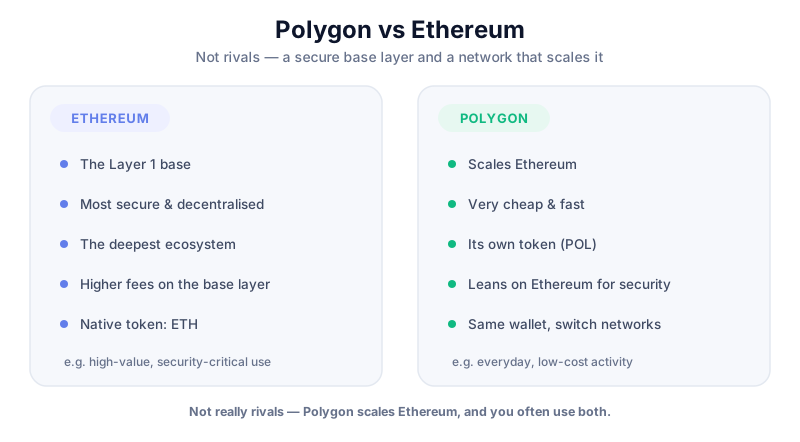
Every blockchain charges a small fee (often called 'gas') to process a transaction. On Ethereum those fees can climb when the network is busy. Polygon handles transactions on its own faster network, so the same action usually costs a tiny fraction as much. That's why it's popular for everyday transfers, DeFi and NFTs.
Getting started, step by step
- Set up an Ethereum-compatible wallet such as MetaMask if you don't have one. Write down your seed phrase on paper and never share it.
- Add the Polygon network to your wallet (reputable wallets often have it built in, or you can add it from official Polygon documentation).
- Get a small amount of POL to cover fees — you can buy it on an exchange and withdraw to your wallet on the Polygon network.
- Confirm your wallet shows the Polygon network is selected before doing anything.
- Send a small test transaction first to make sure everything works, then proceed normally.
MetaMask works with Polygon out of the box and is widely supported. For larger amounts, pair it with a hardware wallet to keep your keys offline.
Moving funds onto Polygon
To move tokens from Ethereum to Polygon, people use a 'bridge'. The simplest and safest route for beginners is often to withdraw directly from an exchange onto the Polygon network. If you do use a bridge, stick to official, well-known ones.
Check the network before you send
Sending crypto on the wrong network is a common, costly beginner mistake — funds can be hard or impossible to recover. Always confirm the network, double-check the address, and test with a tiny amount first.
Staying safe while saving on fees
Cheap transactions make it tempting to experiment with lots of apps. That's fine — but each app you connect your wallet to is a new risk. Be selective, revoke permissions you no longer use, and learn to spot scams.
Only risk what you can afford to lose
Low fees don't make crypto low-risk. Tokens and apps can lose value or fail. Never invest money you can't afford to lose, and never borrow to do it. This is education, not financial advice.
Key takeaways
- Polygon lets you transact for a tiny fraction of typical Ethereum fees.
- Keep a little POL in your wallet to cover those small fees.
- Always confirm the network and test with a small amount first.
- Cheap doesn't mean risk-free — be selective with apps and protect your seed phrase.
Frequently asked questions
Do I need POL to use Polygon?
Yes, a small amount — it pays the tiny network fees. You only need a little, since fees are very low.
What's the easiest way to get tokens onto Polygon?
For beginners, withdrawing directly from an exchange onto the Polygon network is usually simpler and safer than using a bridge. Always test with a small amount first.
Is using Polygon safe for beginners?
The basics are beginner-friendly, but the usual crypto risks apply: protect your seed phrase, verify networks and addresses, and be cautious about which apps you connect your wallet to.
Keep reading
What Is Polygon (POL)? A Plain-English Guide
A beginner-friendly explanation of Polygon and its POL token: what it is, how it speeds up Ethereum, what it's
Polygon vs Ethereum: What's the Difference?
A fair, jargon-light comparison of Polygon and Ethereum: how they relate, fees and speed, security trade-offs,
How to Buy Polygon (POL) Safely: Step by Step
A safe, beginner-friendly walkthrough for buying Polygon's POL token: choosing an exchange, verifying your acc