Wallet Drainer Scams Explained
A wallet drainer is a piece of malicious code, usually hidden behind a convincing website, that empties your crypto wallet the moment you approve a transaction. You don't get hacked in the traditional sense — you're tricked into signing away your own funds. This guide explains how drainers work and the handful of habits that keep you safe.
The 20-second version
Drainers live on fake or hacked websites that ask you to 'connect' your wallet and then sign a transaction. That signature hands over control of your tokens. The fix: read what you're signing, never approve a transaction you don't understand, and treat unsolicited links as hostile.
What a wallet drainer actually is
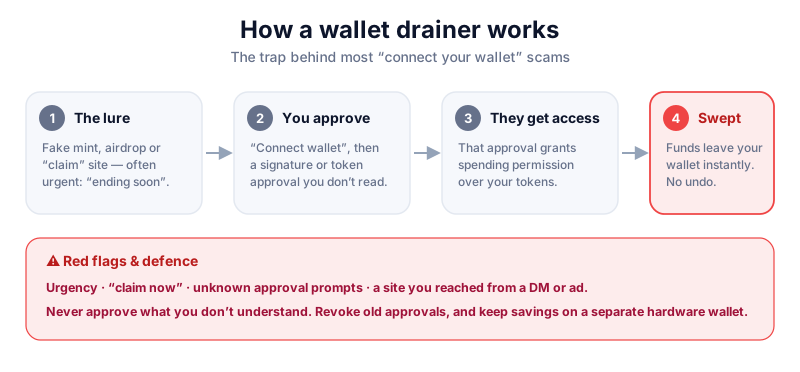
A wallet drainer is a ready-made scam kit sold to criminals. It bundles a fake website, a connect-wallet button, and a malicious smart-contract interaction. When you sign, you aren't sending a normal payment — you're granting the attacker permission to move your tokens, or directly transferring them. Drainer kits became a major threat from 2023 onward, with security researchers attributing hundreds of millions in losses across thousands of victims.
The key thing to understand: your seed phrase is never typed in. Drainers don't need it. They only need one signature from you, which is why they invest so heavily in making the request look routine. A hardware wallet that shows exactly what you're signing — like the air-gapped Keystone — is a strong defence, because you can catch a malicious approval on the device screen before you confirm it.
How the trap is set
Drainers are spread through fake airdrop pages, cloned versions of real apps, hacked project social-media accounts, malicious ads at the top of search results, and direct messages. The page looks legitimate — often a pixel-perfect copy — and pushes you to act fast.
- Token approvals — you grant a contract permission to spend a token, and the attacker drains it later.
- Permit / Permit2 signatures — a gasless 'signature' that quietly authorises transfers without an on-chain transaction you'd notice.
- setApprovalForAll — common for NFTs; one signature hands over an entire collection.
- Direct transfers — the simplest case: you're tricked into signing a send to the attacker's address.
The signature is the attack
If a website asks you to sign something to 'verify', 'claim', 'validate', or 'connect for rewards', stop. A legitimate site never needs you to approve unlimited spending to prove you own a wallet.
How to protect yourself
- Slow down. Drainers rely on urgency and FOMO. There is no airdrop or deadline worth rushing a signature for.
- Read the transaction. Wallets like MetaMask and Rabby show what you're approving — if it says 'approve all' or names an unfamiliar contract, reject it.
- Use a wallet that simulates transactions and flags known drainers (Rabby and modern MetaMask do this).
- Keep a separate 'burner' wallet with small amounts for connecting to new apps, and keep savings in a hardware wallet you never connect to random sites.
- Regularly review and revoke old token approvals using a reputable revoke tool, and bookmark official sites instead of searching for them.
A hardware wallet displays the real transaction details on its own screen, so a fake website can't hide what you're signing. The Ledger Nano X is our top pick for most people — read our review first.
If you think you've been drained
- Move any remaining funds to a brand-new wallet created on a clean device immediately.
- Revoke every active approval on the compromised wallet, then stop using it.
- Assume the compromised wallet is permanently unsafe — never receive funds back to it.
- Report the scam site and the address; it won't recover funds, but it helps others and aids investigations.
No one can reverse it
Anyone in a DM promising to 'recover' your drained funds for a fee is running a second scam. On-chain transactions are final. See how to avoid crypto scams.
Key takeaways
- Drainers steal by tricking you into signing, not by stealing your seed phrase.
- Treat any unsolicited 'claim', 'verify' or 'connect for rewards' request as hostile.
- Read every signature; reject anything granting broad or unlimited spending.
- Keep savings in cold storage and use a burner wallet for new apps.
Frequently asked questions
Can a drainer steal funds just because I connected my wallet?
Connecting alone reveals your address but doesn't move funds. The theft happens when you sign a transaction or approval. Still, only connect to sites you trust.
Does a hardware wallet make me immune?
It greatly helps because you confirm the real details on the device screen, but you can still approve a malicious transaction if you don't read it. The device protects your keys, not your judgement.
What is 'revoking approvals'?
It cancels permissions you previously granted to smart contracts. Doing it periodically closes the door on approvals a drainer may be waiting to exploit.
Keep reading
How to Avoid Crypto Scams: The Cornerstone Safety Guide
The common crypto scams — fake support, phishing, giveaways, romance and rug pulls — and the simple habits tha
Fake Airdrop Scams Explained
Fake airdrops dangle free tokens to lure you onto a malicious site. Learn how the bait works and how to claim
Clipboard Malware Explained
Clipboard hijacking malware silently swaps a crypto address you copied for the attacker's. Learn how it works