The Best Hardware Wallets (2026): Honest Picks for UK Buyers
There is no single 'best' hardware wallet, and anyone who tells you otherwise is selling something. The right device depends entirely on what you're protecting and how you'll actually use it — a first-time saver, a Bitcoin-only purist and a multisig power user all want different things. This guide matches the main devices to the buyer, is honest about every trade-off, and hammers the one rule that matters more than the model you pick.
The 20-second version
A hardware wallet keeps your private keys offline, out of reach of malware and dodgy websites. The 'best' one depends on your needs: cheap and beginner-friendly, Bitcoin-only, fully air-gapped, or open-source and verifiable. Prices move constantly, so check the current figure — and whatever you choose, buy direct from the manufacturer and run the genuine check. That last point matters more than the brand.
How we picked (and what 'best' actually means)
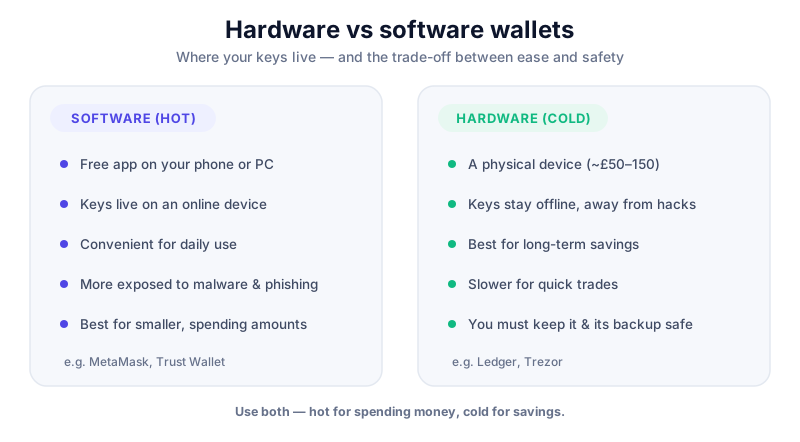
A hardware wallet is a small offline device that holds your private keys and signs transactions without ever exposing those keys to your connected phone or laptop. If you're new to the idea, start with hot vs cold wallets and hardware vs software wallets — this page assumes you've decided you want cold storage and are trying to choose between devices.
We're not going to crown one winner, because the honest answer is that the best device is the one that fits your threat model, your budget and how you'll use it. A device that's perfect for a Bitcoin-only saver is overkill for someone holding a bit of everything, and the touchscreen convenience one person loves is another person's larger attack surface. Every wallet here involves trade-offs — closed versus open source, price versus features, convenience versus air-gap purity — and we'll name them plainly. No device is 'unhackable', and the weakest link is almost always the human and their backup, not the chip.
About the prices below
Every figure here is a rough guide, often a US dollar list price converted loosely, and UK street prices move constantly with stock and promotions. Treat each number as 'from around £X, check the current price on the vendor's site' rather than a fixed fact. Availability on UK marketplaces varies too — which is exactly why buying direct matters.
The best hardware wallets for UK buyers at a glance
Here's the short version, mapping a type of buyer to a sensible pick. Each name links to our full review so you can dig into the detail before deciding. This is a comparison to help you choose, not a recommendation to buy any particular device — that call is yours.
| If you're... | Consider | Rough price | Why |
|---|---|---|---|
| A beginner | Ledger Nano S Plus / Nano X | from ~£55 / ~£85 | Cheap, polished app, huge coin support |
| Bitcoin-only | Coldcard / BitBox02 | from ~£120 / ~£120 | Stripped, focused, smaller attack surface |
| After air-gap | Keystone / Coldcard | from ~£120 | Signs via QR or microSD, no data cable |
| Open-source minded | BitBox02 / OneKey | from ~£120 / ~£65 | Firmware you can inspect and verify |
| On a budget | SafePal / OneKey | from ~£40 / ~£65 | Cheapest safe-ish entry to cold storage |
| Into seedless backup | Cypherock | from ~£85 | No single seed phrase; split across cards |
| Future-proofing | Trezor Safe 7 / Safe 5 | from ~£140 / ~£110 | Newest chips, touchscreen, more features |
The rest of this guide walks through each group, the honest catch with each pick, and links to the full review. If you'd rather browse everything, see all our wallet and exchange reviews or the wider security hub.
Best for beginners: Ledger Nano S Plus and Nano X
For a first hardware wallet, Ledger is the default recommendation for a reason: the Ledger Live app is well made, the coin support is enormous, and the devices are cheap enough to be an easy first step out of a hot wallet. The Ledger Nano S Plus is the value pick — USB-only and Android-only on mobile, but genuinely capable — while the Ledger Nano X adds Bluetooth and iOS support for people who want to manage things from an iPhone.
The honest caveat with Ledger is philosophical. Its secure-element firmware is closed source, so you're trusting Ledger's word on how the device behaves rather than being able to inspect it yourself. The 2023 Ledger Recover service — an opt-in feature that can back up an encrypted split of your seed across third parties — reignited a long-running debate about whether 'the key never leaves the device' is truly absolute. Combined with a 2020 customer-data breach, it's why some reviewers rank Ledger below open-source rivals on trust. To be clear, this is ongoing criticism and a matter of philosophy, not a live exploit — funds on a properly set-up Ledger aren't sitting exposed. But if verifiable, open firmware is a priority for you, it's a genuine reason to look at the picks further down.
The Nano X pairs a mature app with Bluetooth and broad coin support, which is why it's a common first hardware wallet. If you buy through our link we may earn a commission at no cost to you — it never changes our verdicts. Always buy direct from Ledger, never second-hand.
Prefer a touchscreen? Trezor's Safe 5 is the mainstream alternative — a colour touchscreen device with a secure element and Shamir backup, and Trezor's firmware is open source. It costs more than the entry Ledger, so it's a features-versus-price call. Whichever way you lean, both are sensible first devices; read the full Trezor Safe 5 and Ledger Nano X reviews if you're torn.
Best for open source and Bitcoin-only: BitBox02 and Coldcard
If you want firmware you can actually inspect, the BitBox02 from Swiss maker BitBox is a strong shout. It's fully open source — firmware and hardware schematics on GitHub with reproducible builds — uses a dual-chip design and backs up to microSD. It comes in a Multi edition and a Bitcoin-only edition; the Bitcoin-only version runs stripped-down firmware, which means a smaller attack surface. There's also a newer Nova model, so confirm the current line-up on BitBox's own site before buying.
The BitBox02 is a good fit if you value verifiable firmware and a clean setup, in Multi or Bitcoin-only flavours. If you buy through our link we may earn a commission at no cost to you — it never affects our verdicts. Buy direct from BitBox and run the genuine check on first use.
For Bitcoin purists, the Coldcard is the veteran choice — Bitcoin-only since 2017, air-gapped via microSD, with two secure-element chips sourced from different vendors and open firmware you can verify. It pairs with software like Sparrow or Electrum for watch-only balances and offline signing. It is squarely aimed at more advanced Bitcoin users: powerful and paranoid by design, but not the friendliest first device, and the Mk4 and Q models differ in screen and input, so check which SKU you're getting. We don't have an affiliate arrangement for Coldcard, so the review is the place to weigh it up.
Best for air-gapped security and novel backups: Keystone and Cypherock
An air-gapped wallet never makes a data connection to your phone or computer — it signs transactions by scanning QR codes or swapping a microSD card, so there's no USB data path for malware to travel down. The Keystone 3 Pro is the accessible face of this approach: a 4-inch touchscreen device with three secure-element chips, a fingerprint reader and open-source firmware, that signs purely over QR (its USB-C port is power-only). For anyone with a larger balance who wants that extra layer between the keys and the internet, it's an easy device to like.

The Keystone 3 Pro signs over QR with no data cable, which suits larger balances and a stricter threat model. If you buy through our link we may earn a commission at no cost to you — it doesn't change what we recommend. Buy direct from Keystone and verify the device on setup.
The novel option is Cypherock, which is seedless — there's no single 24-word phrase to lose or have stolen. Instead it splits your wallet across an X1 Vault and four NFC cards using a 2-of-5 secret-sharing scheme: any two components rebuild the wallet, and one on its own reveals nothing. It's passed an independent audit and the firmware is open source. Cypherock markets support for very large numbers of coins; treat the biggest figures as marketing and check the current asset list for the coins you actually hold. It's a genuinely different way to handle the backup problem — read the Cypherock review to see whether that model suits how you think about risk.
One thing all these do well is multisig — spreading control across several devices so no single one is a point of failure. Coldcard, BitBox02 and Keystone all support it via tools like Sparrow. If that's where you're heading, good crypto opsec basics matter even more once several devices are involved.
Best on a budget: OneKey and SafePal
You don't have to spend three figures to get off a hot wallet. OneKey offers open-source firmware and apps with a secure-element chip, with the Classic model starting from around £65 (check the current price). SafePal goes cheaper still — its S1 model is one of the least expensive cold wallets around, with pricier S1 Pro and X1 variants above it.
The honest note here: cheaper devices sometimes use a lower-grade secure element or a more basic build, so the very lowest price often trades away a little hardware robustness. That's a reasonable compromise for a modest balance, and both brands are open source, which counts for a lot. For a small stack it's a sensible step up from keeping everything in a phone app — just size the device to what you're protecting. You can compare inline via OneKey and SafePal, and read the full reviews before deciding.
The backup is worth more than the device
Whatever you spend on the wallet, your recovery seed is the real prize a thief wants and the thing a fire or flood can destroy. A stamped metal backup such as Trezor's Keep Metal survives what paper won't. Store it separately from the device, and never photograph or type your seed into anything.
Before you buy: buying safely in the UK
This is the load-bearing bit, and it matters more than which model you pick. Buy only from the manufacturer's official store or a listed authorised reseller. There are repeated reports of tampered or pre-activated devices sold through marketplace sellers, and a compromised device can hand your funds straight to an attacker. A cheap listing from an unknown third-party seller is not worth the saving.
Stop immediately if you see any of these
A brand-new hardware wallet should arrive uninitialised. If the device is already activated, comes with a pre-printed 'initial PIN' or password, or includes any pre-written recovery words 'to get you started' — stop. Do not use it, do not move funds to it, and report the seller. A genuine device only ever generates your seed on the device, in front of you.
- Buy direct. Order from the manufacturer's own website, or an authorised reseller listed on that site — not a random Amazon or eBay seller.
- Inspect on arrival. Check the packaging, and confirm the device is uninitialised with no pre-set PIN and no pre-written seed words.
- Run the genuine check. Every major vendor has an app-based check that cryptographically verifies the device's secure element. Do this before you do anything else.
- Set it up yourself. Let the device generate a fresh seed, write it down offline, and never enter it into a phone, website or pop-up.
The same discipline extends past unboxing. Good crypto opsec — keeping your seed offline, ignoring unsolicited 'support', and treating every wallet pop-up with suspicion — is what stops wallet-drainer scams that no hardware device can save you from once you approve them. If you want the broader playbook, how to avoid crypto scams pulls it together.
Key takeaways
- There's no single 'best' hardware wallet — match the device to your budget, your coins and how you'll use it, not to the loudest marketing.
- Ledger is the easy beginner pick, but its closed-source firmware and the Recover debate are a genuine trust trade-off; open-source rivals like BitBox02 and OneKey answer that concern.
- Air-gapped devices (Keystone, Coldcard) suit larger balances and stricter threat models; Cypherock's seedless card-based backup is a different way to solve the same problem.
- Every price here is volatile — treat figures as rough guides and check the current price on the vendor's own site before buying.
- The rule that beats every model choice: buy direct from the manufacturer, refuse any pre-activated or seed-included device, and run the genuine check first.
Frequently asked questions
Which hardware wallet is best for a beginner in the UK?
For most first-timers the cheapest safe entry is the Ledger Nano S Plus, with the Nano X a step up if you want Bluetooth and iPhone support. If you'd rather have a touchscreen and open-source firmware, the Trezor Safe 5 is the main alternative. All three are sensible first devices — the difference is price versus features, and whether open source matters to you. Prices move, so check the current figure before buying.
Is Ledger still safe after the Recover controversy?
For storing crypto, yes — a properly set-up Ledger keeps your keys offline like any hardware wallet, and Recover is an opt-in feature you don't have to use. The lasting objection is philosophical: Ledger's secure-element firmware is closed source, so you're trusting the company rather than being able to verify the code yourself. That's a real trade-off, not a live exploit. If verifiable, open firmware is a priority for you, look at BitBox02, Coldcard or OneKey instead. We don't tell anyone what to buy — the call is yours.
Do I need an air-gapped wallet, or is USB fine?
For most people with a modest balance, a good USB hardware wallet is plenty — the keys still never leave the device. An air-gapped wallet (signing via QR or microSD, no data cable) adds an extra layer that mainly benefits people protecting large balances or with a stricter threat model. It's about matching the device to what you're guarding, not chasing the most 'hardcore' option for its own sake.
Where should I buy a hardware wallet in the UK — is Amazon safe?
Buy direct from the manufacturer's official store or an authorised reseller listed on their site. Marketplace listings from unknown third-party sellers carry a real risk of tampered or pre-activated devices, so a cheap Amazon or eBay listing isn't worth it. When it arrives, confirm it's uninitialised with no pre-set PIN or pre-written seed, then run the vendor's genuine check before doing anything else. If anything looks pre-activated, stop and report the seller.
Keep reading
Hot vs Cold Wallets: What's the Difference?
A plain-English hot vs cold wallets comparison — how each works, the security trade-offs, and how to combine b
Hardware vs Software Wallets (2026): Which Should You Use?
Hardware vs software wallets compared: security, convenience, cost and the right use for each — so you can pro
Crypto OpSec Basics: Stay Private and Safe
Operational security for everyday crypto users: how to reduce your attack surface, protect your privacy, and a