Connected Your Wallet to a Scam Site? Do This Now
Connected your wallet to a presale dashboard that's now looking very wrong? Take a breath — connecting alone rarely loses funds. What matters is what you signed, and what you do in the next ten minutes. Work through these steps in order; each one closes a specific door.
The 20-second version
1) Stop interacting with the site — and never pay any 'fee' or 'tax' to withdraw. 2) Revoke the site's token approvals with your chain's approval checker or revoke.cash. 3) Move remaining assets to a completely fresh wallet (new seed phrase). 4) Report it. Connection is exposure; signatures are the damage — kill the approvals first.
First, understand your actual exposure
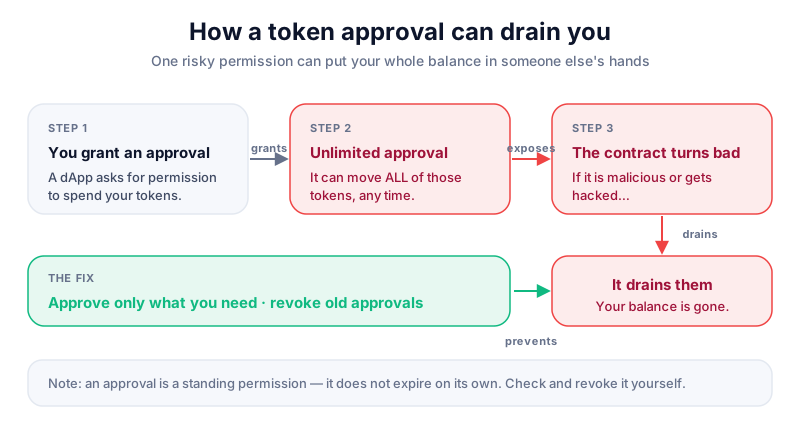
Connecting a wallet mostly shares your address and lets the site propose transactions — annoying, not fatal. The danger is what you approved or signed while connected. A token approval lets the site's contract spend a token on your behalf, up to the amount you approved — often 'unlimited'. That approval survives after you close the tab, which is how wallet drainers empty accounts hours or weeks later.
If funds are already gone
Approvals can't reverse past theft — the steps below stop *further* losses. For the aftermath of an actual theft, work through what to do if you get scammed and recovering a hacked wallet alongside this page.
Step 1 — Disengage (and refuse the 'unlock fee')
Close the site. Don't click anything else on it, don't sign anything new, and don't respond to its Telegram 'support'. Above all: if the site or anyone claiming to represent it says you must pay a fee, tax or gas charge to withdraw or unlock your tokens — that is the scam's second act. No legitimate protocol charges an off-chain fee to release your own assets. People routinely lose more to the 'recovery' step than the original bait; the fake support playbook exists precisely for this moment.
Step 2 — Revoke the token approvals
This is the step that actually disarms the trap. You're going to list every contract allowed to spend your tokens, and cancel the ones you don't recognise or need:
- Open an approval checker. The big block explorers have official ones (Etherscan's Token Approval Checker for Ethereum, BscScan's for BNB Chain), or use revoke.cash, which covers most EVM chains in one place. Type the address by hand or use a saved bookmark — searching 'revoke' in a panic is how people land on fake revoke sites.
- Paste in your wallet address and connect (read-only listing works without connecting; revoking requires connecting).
- Review the list. Sort by most recent — the scam site's approval will be at the top. Treat any 'Unlimited' allowance to a contract you can't name as hostile.
- Click revoke on each bad approval and confirm in your wallet. Each revocation is a small on-chain transaction, so you'll pay a little gas — pennies well spent.
- On Solana, the equivalent risk is delegated token accounts — wallets like Phantom expose connected apps and token delegations in settings; remove anything you don't recognise.
Revoking is good hygiene, not just first aid
Approvals accumulate for everyone who uses DeFi. Running an approval audit every few months — scam or no scam — is one of the cheapest security habits in crypto.
Step 3 — Move what's left to a genuinely fresh wallet
If you signed things you didn't understand — or the site had you enter or 'validate' your seed phrase (game over for that wallet, no exceptions) — assume the wallet is compromised and evacuate:
- Create a brand-new wallet with a brand-new seed phrase on a clean device. Not a new account under the old seed — a new seed. If malware on your computer is a possibility, set the new wallet up on a different device entirely.
- Send a small test amount first, confirm it arrives, then move the rest, starting with the most valuable assets.
- Leave the old wallet as a decoy with nothing in it, and never reuse its seed phrase for anything again.
If you're starting a fresh wallet anyway, start it properly: a hardware wallet like the Ledger Nano X generates and keeps its keys offline, and every future transaction has to be physically confirmed on the device — so a malicious website can never silently sign for you again.
Back the new seed up on paper or metal, offline, and nowhere digital — no photos, no cloud notes, no password managers.
Step 4 — Report it (it genuinely helps)
Reports get scam domains blocklisted in wallets and browsers, feed FCA and police intelligence, and occasionally freeze funds at exchange off-ramps. Report the site to Action Fraud (England, Wales & NI) or Police Scotland, and report the promotion to the FCA — unauthorised crypto promotions to UK consumers are a criminal offence. The full walkthrough of who to tell and what to include is in the UK rule that exposes illegal crypto promotions. Also flag the site in your wallet (most have a 'report' option) so the next person gets a warning screen instead of a drained account.
Key takeaways
- Connecting is exposure; approvals and signatures are the damage — revoke them first
- Never pay a 'fee' or 'tax' to unlock tokens: that's the scam's second act
- Use official approval checkers or revoke.cash, reached by typed URL — not a panicked search
- If a seed phrase touched the site, the wallet is dead: new seed, clean device, evacuate
- Report to Action Fraud and the FCA — reports drive the blocklists that protect the next person
Frequently asked questions
I only connected — I didn't sign anything. Am I safe?
Mostly, yes. Connection shares your address and balance visibility, which may earn you targeted phishing later, but it can't move funds. Disconnect the site in your wallet settings, run an approval check to be sure, and be sceptical of any DMs that follow.
Does revoking approvals get back tokens that were already taken?
No — revocation closes the door for the future; it can't undo past transfers. That's why speed matters, and why the evacuation step exists for anything still in the wallet.
The scam site shows my tokens 'staked' and growing — are they real?
The numbers on their dashboard are just text on their website. If your assets left your wallet for theirs, treat them as gone, and don't pay anything to 'unstake'. Check your real balances on a block explorer, not on their site.
Is revoke.cash itself safe?
It's a well-known open-source tool, and the explorer-hosted checkers (Etherscan, BscScan) are official. The real danger is lookalike 'revoke' sites reached via search ads — type the address, use the explorer's own tool, or follow a bookmark you made in calm times.
Keep reading
Wallet Drainer Scams Explained
How wallet-drainer scams trick you into signing a malicious transaction that empties your wallet in seconds —
What to Do If You Get Scammed in Crypto
A calm, practical step-by-step plan for what to do immediately after a crypto scam — how to limit the damage,
How to Recover a Hacked Crypto Wallet (Calm, Step-by-Step)
If your crypto wallet has been hacked or drained, here's a calm, practical plan: what to do first, how to limi