How to Read a Block Explorer
A block explorer is a free public search engine for a blockchain. Paste in a transaction ID, an address, or a token name, and it shows you exactly what happened on-chain. Learning to read one turns crypto from a black box into something you can verify yourself — which is the single best defence against confusion and scams.
The 20-second version
A block explorer lets anyone look up transactions, addresses and tokens on a public blockchain. Use it to confirm a payment arrived, check how many confirmations it has, see the fee paid, and verify a token's real contract address. It's free and read-only.
What a block explorer shows
Every public blockchain records its transactions openly, and a block explorer is the window into that record. Each network has its own — Etherscan for Ethereum, Solscan for Solana, and so on. They're free, require no account, and can only read the chain; they can never move your funds or ask for your keys.
You can search three main things: a transaction ID (also called a hash or 'txid'), a wallet address, or a token. Each gives you a different view of what's happening on-chain.
Looking up a transaction
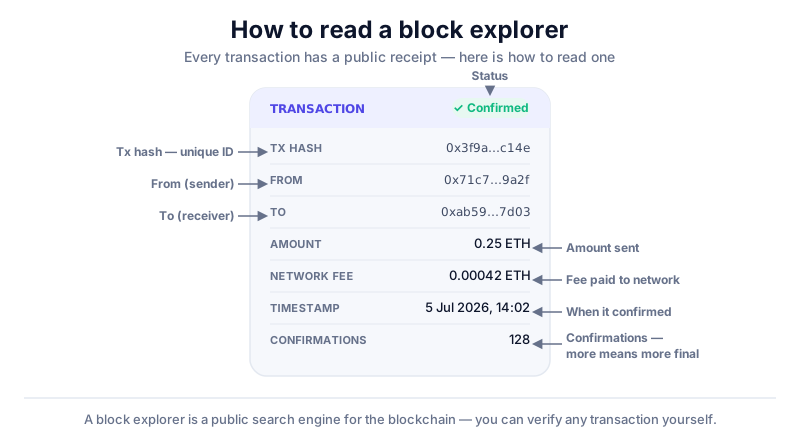
After you send or receive crypto, your wallet gives you a transaction ID. Paste it into the explorer's search box to see its status. This is the proper way to confirm a transfer — far more reliable than waiting for a balance to update.
- Status — pending (broadcast but not yet in a block) or success/confirmed.
- Confirmations — how many blocks have been added since; more means more final.
- From / To — the sending and receiving addresses.
- Fee — what was paid to the network to process it.
- Timestamp — when it was included in a block.
Checking addresses and tokens
Search an address to see its balance and full transaction history — a reminder that on a public chain, activity is visible to everyone. Search a token to find its official contract address, which you can match against the one a DEX shows you to make sure you're trading the real thing and not a copycat.
Verify token contracts here
Scam tokens copy the names and logos of real projects. A block explorer shows a token's verified contract address and details — cross-check it against the project's official site before you swap, every time.
Using explorers safely
An explorer never needs your keys
A real block explorer is read-only — it never asks you to connect a wallet for a basic lookup, and never asks for your seed phrase. Any 'explorer' requesting your phrase or a wallet signature to 'view' a transaction is a scam.
- Reach explorers via their official, bookmarked URL — fakes appear in search ads.
- A 'pending forever' transaction usually means a low fee or a busy network.
- Don't read too much into a single address — many belong to exchanges or contracts.
Key takeaways
- A block explorer is a free, read-only search engine for a blockchain.
- Use it to confirm transactions and check confirmations and fees.
- Verify a token's real contract address before swapping.
- A genuine explorer never asks for your seed phrase or keys.
Frequently asked questions
What is a transaction ID?
It's the unique fingerprint (a 'hash') of a transaction. Your wallet shows it after you send, and pasting it into a block explorer pulls up that transaction's full details.
How many confirmations are enough?
It depends on the network and the amount. Small transfers may be fine with a few; for larger sums, waiting for more confirmations gives stronger certainty that the transaction is final.
Can someone see my whole balance on an explorer?
If they know your address, yes — public blockchains are transparent. This is normal, but it's why some people use a fresh address per transaction for privacy.
Keep reading
How to Send Crypto (Step by Step)
A plain-English guide to sending cryptocurrency: copying the right address, picking the correct network, fees,
How to Receive Crypto (Step by Step)
How to receive cryptocurrency safely: finding your receive address, sharing it the right way, matching network
How to Do a Test Transaction (and Avoid Costly Mistakes)
Why a small test transaction is the simplest habit in crypto, when to use one, and how to do it step by step b