The Best Crypto Tax Software for UK Investors (2026)
If you've traded across a few exchanges and wallets, working out your UK crypto tax by hand is grim — which is why most people reach for software. This is a general comparison of the main tools UK investors use, not a recommendation about your own tax position.
The 20-second version
Crypto tax software connects to your exchanges and wallets, applies HMRC's pooling and Same-Day/30-day rules, and produces a report you can transfer onto your Self Assessment. Koinly is our overall pick for UK investors, but the right tool depends on how many transactions and chains you use. Whatever you choose, the numbers are yours to check — verify against HMRC guidance or a qualified accountant.
Read this first
This is education, not tax advice
Tax rules, rates and allowances change, and your situation is unique. Nothing here is personal advice, and naming a tool is not a promise its output is correct for you. Always check the current official HMRC guidance (the Cryptoassets Manual) or speak to a qualified accountant before filing.
What crypto tax software actually does
These tools all do roughly the same job. You connect your exchange accounts and wallets (by read-only API key, public address or CSV export), the software imports your transaction history, and it then calculates your gains, losses and any income for the tax year. For the UK that means applying HMRC's share-pooling method plus the Same-Day and 30-day (bed-and-breakfasting) matching rules — the fiddly bits that are easy to get wrong by hand.
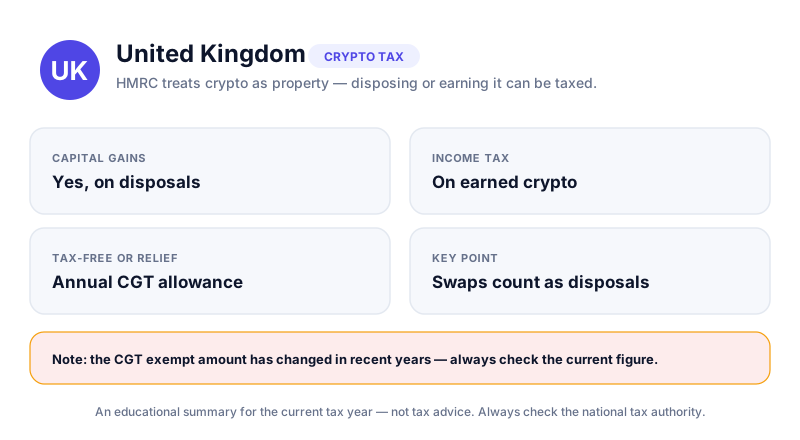
The output is a report you can use to fill in your return. If you want the background on how those calculations work, see how to calculate crypto capital gains in the UK and the broader UK crypto tax overview. Software speeds up the maths; it does not replace understanding what it's doing.
Free to preview, pay to export
Most of these tools let you import everything and see your numbers for free. You usually only pay when you want to download the finished report for a given tax year. That means you can trial a tool on your real data before spending anything.
The tools compared
Here's a quick side-by-side of the five tools UK investors mention most. Prices are rough guides in pounds for a single tax-year report and change often — always check the current pricing and free limits on each provider's own site before paying.
| Tool | Best for | UK / HMRC report | Free preview | From (approx.) |
|---|---|---|---|---|
| Koinly | Most UK investors; broad coverage | Yes — SA108-ready | Yes | ~£40 |
| CoinLedger | Simpler portfolios; clean interface | Yes | Yes | ~£40 |
| CoinTracking | High-volume traders; deep analytics | Yes | Yes (limited) | ~£8/mo |
| Recap | Privacy-focused UK users | Yes — UK-built | Yes | ~£25 |
| Blockpit | EU/UK users; mobile-first | Yes | Yes | ~£40 |
The pattern across all of them is the same: free to import and preview, pay only to download. The real differences are in how many exchanges and chains they support, how well they handle DeFi and NFTs, and how clean the UK report is.
Our pick for UK investors: Koinly
For most UK investors we rate Koinly as the strongest all-rounder. It supports 800+ exchanges, wallets and blockchains, applies HMRC's pooling and Same-Day/30-day rules automatically, and produces a report formatted for UK Self Assessment — including the figures you need for the SA108 capital gains pages. There's a full breakdown in our Koinly review.
What makes it a sensible default is breadth plus a genuinely free preview. You can connect everything, see your gains and income for the year, and only pay if you decide to download the report. It also handles the awkward areas reasonably well — see DeFi and NFT tax in the UK and staking and mining tax for why those matter — though complex DeFi activity always deserves a manual sanity-check.
Trial it on your real data first
Because import and preview are free, you can connect your accounts to Koinly (or any of these tools) and compare the headline gain figure against a rough manual estimate before paying. If the numbers look wildly off, that usually means a missing import or a mis-tagged transaction — fix that before you file.
The alternatives, fairly
Koinly won't be the best fit for everyone. The right tool depends mainly on how many transactions you have and which chains and protocols you use. Here's where the others earn their place.
CoinLedger
A clean, beginner-friendly option that handles UK reports and walks you through imports clearly. If your activity is mostly buying, selling and holding on a couple of mainstream exchanges, it's easy to get right. Full notes in our CoinLedger review.
CoinTracking
The veteran of the space and a favourite of high-volume traders. It offers deep analytics and a generous free tier on transaction count, at the cost of a busier, more technical interface. If you make thousands of trades a year, its tooling can pay off — see the CoinTracking review.
Recap
A UK-built tool with a strong privacy angle (it encrypts your data end-to-end) and a clear focus on HMRC rules. Worth a look if you're privacy-conscious and want something designed for UK reporting from the ground up. More in the Recap review.
Blockpit
A polished, mobile-first option popular across the EU that also produces UK reports. Good if you want to manage things from your phone. See the Blockpit review for the detail.
Connect accounts with read-only access
When you link an exchange via API, use a read-only key wherever possible — the software needs to read your history, never to trade or withdraw. For wallets, a public address is enough. This keeps your funds safe; see how to store bitcoin safely and how to avoid crypto scams for the wider habits.
How to choose the right one
There's no single best tool for everyone. A short way to narrow it down:
- Count your transactions for the year — that drives both the pricing tier and which free limits matter.
- List the exchanges, wallets and chains you've actually used, and check each tool supports them before paying.
- Import your data into one or two free previews and compare the headline gain figure.
- Look at how the awkward parts — DeFi, staking, NFTs, airdrops — are categorised, and re-tag anything that looks wrong.
- Only when the numbers look sensible, pay to download the UK report and use it to complete your return.
Remember the software produces a draft, not a verdict. You're responsible for what goes on your return, so reconcile the output against your own records and the rules in how to file crypto tax on Self Assessment. Good record-keeping all year makes every one of these tools far more accurate.
Koinly connects your exchanges and wallets, applies HMRC's pooling and Same-Day/30-day rules automatically, and is free to preview. You only pay when you're ready to download the SA108-ready report for your return.
Key takeaways
- Crypto tax software imports your history and applies HMRC's pooling and Same-Day/30-day rules for you.
- Koinly is our overall pick for UK investors — broad coverage and an SA108-ready report.
- CoinLedger, CoinTracking, Recap (UK-built) and Blockpit are solid alternatives for different needs.
- The right tool depends on your transaction count and which chains you use — trial the free preview first.
- Software gives a draft, not a final answer — check it against HMRC guidance or an accountant.
Frequently asked questions
Do I have to use software to do my UK crypto tax?
No. You can calculate everything by hand or in a spreadsheet, and for a handful of transactions that may be fine. Software mainly saves time and reduces errors once you have many trades across several platforms, where HMRC's pooling and matching rules get fiddly.
Will these tools give me the exact figure HMRC expects?
They aim to, but the output depends entirely on the data you feed in. Missing imports, duplicate entries or mis-tagged transactions all change the result. Treat the report as a strong draft to review, not a guaranteed answer, and check it against HMRC guidance or an accountant.
Is it safe to connect my exchange accounts?
Use read-only API keys where the option exists, so the tool can read your history but cannot trade or withdraw. For wallets, a public address is enough. Never share private keys or seed phrases with any tax tool.
How much does crypto tax software cost in the UK?
Most tools are free to import and preview, and charge only when you download a report — often roughly £25 to £100 for a single tax year depending on your transaction count. Prices change, so check each provider's current pricing before paying.
Keep reading
Crypto Taxes in the UK: A Plain-English Overview (HMRC)
How HMRC generally treats crypto for UK taxpayers — capital gains, income, record-keeping and allowances — exp
Koinly Review (2026): The Best Crypto Tax Software for UK Users?
Our Koinly review: the most HMRC-ready crypto tax software we've used, with Same-Day and Bed-and-Breakfasting
How to Report Crypto on a UK Self Assessment (SA100 & SA108)
A plain-English walkthrough of reporting crypto gains and income to HMRC through Self Assessment, including th