How to Report Crypto on a UK Self Assessment (SA100 & SA108)
If you've sold, swapped or earned crypto in the UK, you may need to tell HMRC about it through Self Assessment. This is a general walkthrough of how the return is structured and where crypto fits, not personal tax advice — your own position can differ.
The 20-second version
Crypto gains usually go on the Capital Gains summary (SA108) attached to your main return (SA100); crypto you earned usually goes in the income sections. You register for Self Assessment, gather your records, calculate the figures, then enter them online. Thresholds and rules change, so always check HMRC's current guidance or a qualified accountant before filing.
Read this first
This is education, not tax advice
Tax rules, rates, allowances and reporting thresholds change, and your situation is unique. Nothing here is personal advice. Always check the current official HMRC guidance (the Cryptoassets Manual) or speak to a qualified accountant before you register or file.
What Self Assessment is, and when crypto belongs on it
Self Assessment is the system HMRC uses to collect tax that isn't taken automatically through PAYE. If you have crypto gains or income that aren't already accounted for, this is usually how you report them. For the bigger picture on how crypto is taxed, see our UK crypto tax overview.
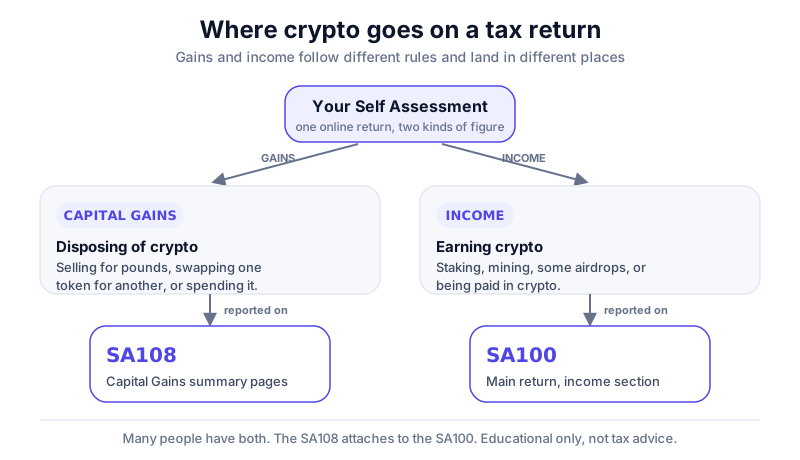
Two broad situations tend to bring crypto into Self Assessment. The first is disposing of crypto — selling for pounds, swapping one token for another, or spending it — which can produce a capital gain. The second is earning crypto, for example through some staking rewards, certain airdrops, or being paid in crypto, which is usually treated as income.
Whether you actually need to file depends on the amounts involved and on reporting thresholds that HMRC sets and updates. Small gains within the annual exempt amount may not need reporting at all in some years; in others, the rules differ. Don't assume — check the current position on HMRC's site. Our companion piece on the annual allowance and rates explains the moving parts.
Step 1: Register if you need to
If you've never filed before, you generally have to register for Self Assessment before you can submit a return. HMRC then issues a Unique Taxpayer Reference (UTR), which can take time to arrive, so leaving registration to the last minute is a common and avoidable mistake.
- Check on HMRC's website whether your circumstances mean you need to register and file — the criteria are set out there and can change.
- Register through your HMRC online account (the route differs slightly for the self-employed versus those filing only for capital gains or other income).
- Wait for your UTR and activation code to arrive by post, then activate your online account.
- Note the deadlines that apply to you — registration has its own cut-off, separate from the filing deadline.
There's a separate registration deadline
The deadline to register for Self Assessment usually falls earlier in the year than the deadline to file. Missing it can cause problems even if you later file on time, so check the current dates in our deadlines and penalties guide and on HMRC's site.
Step 2: Gather your records
You can't file accurately without complete records, and crypto makes this harder than shares because activity is often spread across many exchanges, wallets and chains. HMRC expects you to keep detailed records and to be able to show your working. Our record-keeping guide goes deeper, but at a minimum you'll want the following.
- The date and type of every transaction (buy, sell, swap, spend, earn).
- The quantity of each asset and its value in pounds at the time.
- Any fees paid, and the wallet or exchange addresses involved.
- Records for income events (staking, mining, airdrops, being paid in crypto) separately from disposals.
Activity in DeFi and NFTs can be especially fiddly to reconstruct, because a single on-chain action may involve several taxable events. Pulling records together early — rather than the night before the deadline — is far less stressful. See our DeFi and NFT tax guide for the kinds of events to look out for.
Step 3: Calculate gains and income
Once your records are complete, you work out two separate figures: your capital gains or losses from disposals, and your crypto income. They follow different rules and land in different parts of the return.
Capital gains
For disposals, HMRC's pooling approach (often called Section 104 pooling) combines holdings of the same token into an average cost, with special Same-Day and 30-day (bed-and-breakfasting) rules layered on top. This is the part people most often get wrong by hand. Our capital gains walkthrough explains the method, and tax-loss harvesting covers how losses can offset gains.
Income
Crypto you earned is generally valued in pounds at the point you received it and taxed as income. The detail depends on the activity — see our staking and mining tax guide. Note that even a crypto-to-crypto swap with no pounds involved can still be a disposal; our piece on whether swapping is taxable covers that surprise.
Software does the pooling for you
Reconstructing pooled cost across multiple exchanges manually is where errors creep in. Crypto tax tools import your transactions and apply the HMRC pooling and Same-Day/30-day rules automatically — see our best crypto tax software round-up for options.
Step 4: Enter the figures (SA100 and SA108)
The main Self Assessment return is the SA100. Capital gains are reported on a supplementary set of pages, the Capital Gains summary, known as the SA108. When you file online, these appear as sections you switch on rather than separate paper forms, but the structure is the same.
| What you're reporting | Roughly where it goes |
|---|---|
| Gains and losses from disposing of crypto | Capital Gains summary (SA108), in the 'other property, assets and gains' style section |
| Crypto received as income (some staking, mining, airdrops, payment) | The relevant income section of the SA100, depending on the activity |
| Supporting figures and computations | Attached or summarised as HMRC's online return requests |
HMRC's online filing service walks you through which boxes to complete and asks supporting questions as you go. The exact box numbers and wording are updated from time to time, so follow the on-screen guidance and HMRC's notes for the current year rather than relying on an old screenshot. Filing for a different country instead? Our US crypto tax overview is a separate read.
Keep your computations
Whether you file yourself or use software, keep the underlying calculations. If HMRC ever asks how you arrived at a figure, a clear record of your pooling and income working is what you'll need to show.
Step 5: Submit, pay and keep evidence
Once the figures are in, you submit the return and the system calculates what's due. There are deadlines for both filing and paying, and they differ for online versus paper returns. Penalties and interest can apply if you're late, so it pays to know the dates well ahead — our deadlines and penalties guide sets out the timeline.
After submitting, save a copy of the return and keep your records for as long as HMRC requires. Good housekeeping now — including keeping your crypto itself secure, see how to store Bitcoin safely — makes next year's return far less painful.
The hard part of a crypto return is rarely the form itself — it's having clean, complete records to put on it.
Koinly connects to your exchanges and wallets, applies HMRC pooling plus the Same-Day and 30-day rules, and produces a Self Assessment-ready SA108 report. It's free to preview your figures — you only pay to download the full report.
Key takeaways
- Crypto gains usually go on the SA108 Capital Gains summary; crypto income goes in the income sections of the SA100.
- Register for Self Assessment early if you've not filed before — the UTR can take time to arrive.
- Complete, accurate records across all exchanges and wallets are the foundation of a correct return.
- Pooling plus Same-Day and 30-day rules make manual gain calculations error-prone — software can apply them for you.
- Thresholds, box numbers and deadlines change, so always check HMRC's current guidance or an accountant.
Frequently asked questions
Do I have to file a Self Assessment just for crypto?
It depends on the amounts and on HMRC's current reporting thresholds, which change year to year. Some small gains within the annual exempt amount may not need reporting, while larger gains or crypto income usually do. Check the current rules on HMRC's site or with an accountant.
What's the difference between the SA100 and the SA108?
The SA100 is the main Self Assessment return. The SA108 is the supplementary Capital Gains summary you attach to it to report gains and losses, including those from disposing of crypto. When filing online they appear as sections of the same return.
Where does staking or airdrop income go?
Crypto you earn is generally treated as income and entered in the relevant income section of the SA100, valued in pounds at the time you received it. The precise treatment depends on the activity, so check HMRC's Cryptoassets Manual.
Can software fill in the return for me?
Crypto tax tools can calculate your gains and income using HMRC's rules and produce an SA108-ready report you transfer into your return. They don't submit the return to HMRC for you, and you remain responsible for the figures you file.
Keep reading
Crypto Taxes in the UK: A Plain-English Overview (HMRC)
How HMRC generally treats crypto for UK taxpayers — capital gains, income, record-keeping and allowances — exp
Koinly Review (2026): The Best Crypto Tax Software for UK Users?
Our Koinly review: the most HMRC-ready crypto tax software we've used, with Same-Day and Bed-and-Breakfasting
How to Calculate Crypto Capital Gains in the UK (Pooling, Same-Day & 30-Day Rules)
A plain-English walkthrough of how HMRC works out crypto capital gains in the UK: the Section 104 pool, the Sa