How to Use Uniswap Safely (Step by Step, Without Getting Burned)
Uniswap is the flagship of decentralised trading — no sign-up, no custodian, any token, any time. That freedom is exactly why it burns beginners: there's no support desk, no undo button, and no one checking whether the token you're buying is real. This walkthrough covers the five places people actually lose money on a DEX — the fake site, the fake token, the slippage setting, the approval, and the signature — and the habit that defuses each one.
The 20-second version
Bookmark the real site (app.uniswap.org) and never arrive by search ad or DM link. Select tokens by verified contract address, not by name or logo. Keep slippage low and deliberate. Approve only what the trade needs, and revoke old approvals routinely. Do a small test swap first, every time.
Before you start: what Uniswap is (and isn't)
If you haven't already, read what Uniswap is and how a DEX works — short version: Uniswap is an automated market maker where you trade against liquidity pools directly from your own wallet. Nobody can freeze your funds — and nobody can refund your mistakes. Anyone can create a token and a pool in minutes, which means the platform being legitimate says nothing about any token on it. Uniswap is the marketplace, not the merchandise.
Step 1 — Arrive at the real Uniswap
- Type app.uniswap.org directly, or use a bookmark you made earlier. Do this every time.
- Never click sponsored search results — phishing clones buy ads on the word 'Uniswap' precisely because it's cheaper than building a scam token.
- Never follow links from DMs, Telegram 'support', or a 'new Uniswap version' announcement. There is no Uniswap v-whatever that arrives by DM.
- Check the padlock and the exact spelling in the address bar before connecting anything — *uniswaps*, *uniswap-app*, *unlswap* are all traps.
The clone-site drain
Fake DEX front-ends look pixel-identical and work normally right up until the moment you sign — then the 'swap' you approve is a wallet drainer. The address bar is the only part of the page a scammer can't fake.
Step 2 — Pick the real token (the step that eats beginners)
Search 'PEPE' on any DEX and you'll find dozens of results with the same name and logo. Names and logos are decoration anyone can copy — the contract address is the only identity a token has. Get the address from the project's official site or a major tracker (CoinGecko/CoinMarketCap list contract addresses on every coin page), paste it into Uniswap's token search, and confirm the result matches. Our companion guide, how to spot fake tokens on a DEX, covers the copycat economy in full — it's the most common way people 'buy the wrong thing' and lose everything.
Warning labels exist — read them
Uniswap's interface flags tokens that aren't on standard token lists. If you see a warning that a token isn't verified, treat it as a stop sign, not a formality — verify the address independently before proceeding.
Step 3 — Understand slippage before touching it
Slippage tolerance is how much worse a price you'll accept between clicking and settlement. For major pairs, small tolerances (well under 1%) usually work fine. Where people get hurt: a trade 'fails' repeatedly, a Telegram voice says *'just set slippage to 30%'*, and suddenly they've authorised paying up to 30% over the odds — which bots and the token's own fee mechanics will happily collect. High required slippage is usually the token telling you something: thin liquidity, transfer taxes, or a honeypot that lets you buy but never sell. When a swap needs extreme slippage to succeed, the correct setting is *walk away*.
Step 4 — Approvals and the signature itself
Swapping a token for the first time needs an approval — permission for the router contract to spend that token. Two habits keep this safe: approve only the amount you're trading where your wallet offers the option (rather than 'unlimited'), and audit and revoke approvals every few months. Then read the actual confirmation in your wallet before signing: what are you sending, what's the minimum you'll receive, which site is asking? Most DEX losses are signatures people didn't read.

This is exactly where an air-gapped hardware wallet earns its keep: the Keystone shows the full transaction on its own screen before anything is authorised — so a spoofed site or malicious pop-up can't sign for you, and a wrong-looking swap gets caught at the last, safest moment.
Step 5 — The test-swap ritual
- Swap a small amount first — a few pounds' worth. Confirm it arrives in your wallet (add the token's contract address to your wallet if it doesn't display automatically).
- Try selling a little back. A token you can buy but not sell is a honeypot — better to learn that with £5 than £5,000.
- Check what you actually received against the expected amount — fee-on-transfer tokens quietly skim a percentage.
- Only then trade your intended size. The ritual costs a little extra gas; it's the cheapest insurance in DeFi.
- Keep records as you go — every swap is a taxable disposal in the UK (yes, crypto-to-crypto counts).
One last habit: trade from a wallet that holds only what you're actively using. Your long-term holdings belong in cold storage, a deliberate step away from whatever the hot wallet signs. Compartmentalisation turns any mistake from a disaster into a lesson.
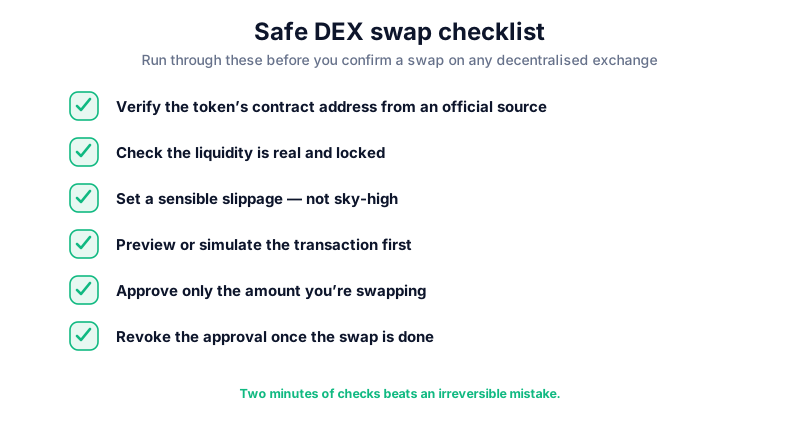
Key takeaways
- Bookmark app.uniswap.org — never arrive by search ad or DM link
- Tokens are identified by contract address, never by name or logo
- Extreme slippage requirements are the token telling you it's a trap
- Approve minimal amounts, read every signature, revoke stale approvals
- Test-swap small — and try selling back — before committing real size
Frequently asked questions
Is Uniswap itself safe to use?
The protocol is among the most battle-tested in DeFi and its contracts have processed trillions in volume. The risks live around it: fake front-ends, fake tokens, bad settings and careless signatures. Uniswap being safe doesn't make any given trade safe — that part is yours.
Why did my swap fail even with correct settings?
Common causes: insufficient ETH for gas, thin liquidity for your size, or a token whose transfer fees exceed your slippage. Failures are annoying but safe — you lose the gas, not the trade amount. Repeated failures demanding ever-higher slippage are a red flag, not a puzzle to solve.
Do I pay tax when I swap one token for another on Uniswap?
In the UK, yes — swapping crypto for crypto is a disposal for Capital Gains Tax purposes even though no pounds were involved. Keep records of every swap; our swap-tax guide explains how it's calculated.
Keep reading
What Is Uniswap? A Plain-English Guide to the DEX
A beginner-friendly guide to Uniswap: how the decentralised exchange works, what the UNI token does, automated
How to Spot Fake Tokens on a DEX (Before You Buy the Wrong One)
On a decentralised exchange, anyone can create a token with any name and logo. The contract-address check, the
How to Use a DEX (Decentralised Exchange)
A beginner's guide to using a decentralised exchange: connecting a wallet, token approvals, slippage, fees, an