How to Set Up a Trezor Hardware Wallet (Step by Step)
A Trezor is a hardware wallet that stores your keys offline and is fully open-source — a favourite for people who want to verify the code that protects their funds. This guide walks through a safe setup, from buying the right way to backing up your recovery seed, and flags the steps where mistakes cost the most.
The 20-second version
Buy a Trezor only from trezor.io or an authorised reseller. Set it up yourself, let the device generate a fresh recovery seed, and write those words on paper stored offline. A genuine device never arrives with a seed already written down — that's a scam.
Step 1: Buy from the right place
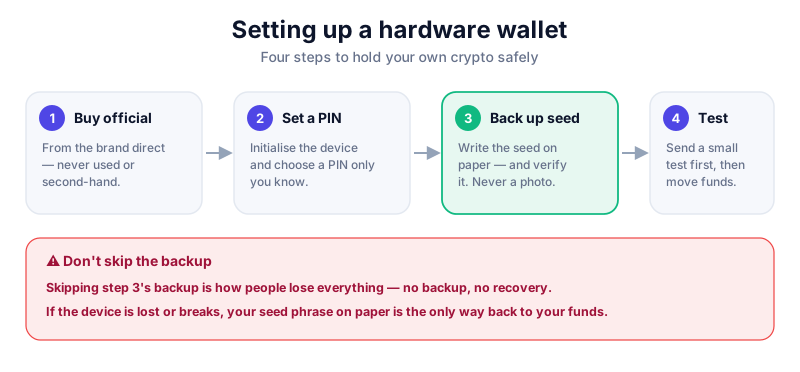
Always buy a Trezor directly from trezor.io or an officially listed reseller — never second-hand, never from a random marketplace seller, and never via a link in a message. Check the packaging is intact when it arrives; Trezor publishes guidance on its tamper-evidence so you can verify your unit.
Never use a supplied seed
A real Trezor comes with no recovery seed. If a device arrives with words pre-written, a 'scratch card', or instructions to import a supplied seed, it is a scam — do not move any funds onto it.
Step 2: Initialise with Trezor Suite
Download Trezor Suite only from trezor.io (desktop app or web), connect the device, and install firmware if prompted. Setup happens on the device itself, so the secret is never exposed to your computer.
- Connect the Trezor and choose 'Create new wallet'.
- Install official firmware if the device asks, then continue.
- Let the device generate a new recovery seed and back it up — on a touchscreen model like the Safe 5 you confirm words on the device.
- Write the seed words on paper or the supplied card, by hand, in exact order.
- Set a PIN on the device, and never reuse a PIN from anywhere else.
Step 3: Protect your recovery seed
Your recovery seed restores every account if the Trezor is lost, stolen or damaged. Keeping it both safe and secret is the heart of self-custody. Some Trezor models also offer advanced backup options like Shamir backup, which splits the seed into multiple shares.
Keep the seed offline, always
Never type your recovery seed into a computer or phone, never photograph it, and never enter it on any website — including ones impersonating Trezor. Trezor will never ask for your seed. Store the paper offline, ideally in two secure places.
- Keep your PIN and recovery seed separate.
- Consider a metal backup for fire and water resistance.
- An optional passphrase adds a 'hidden wallet' layer for advanced users.
Step 4: Add coins and send a test
In Trezor Suite, enable the coins you hold and confirm a receiving address on the device's own screen before trusting it. Every outgoing transaction is approved physically on the Trezor — that offline confirmation is what makes cold storage safe.
- Verify each receiving address on the device, not only on your screen.
- Send a small test amount first, confirm it lands, then move the rest.
- Trezor can also connect to wallets like MetaMask to sign Web3 transactions offline.

The Trezor Safe 5 adds a colour touchscreen and a secure element to Trezor's fully open-source stack. Read our reviews — and only buy direct from the maker.
Key takeaways
- Buy a Trezor only from trezor.io or an authorised reseller.
- A genuine device generates a fresh seed — never use a supplied one.
- Keep your recovery seed on paper, offline, and never digital.
- Verify addresses on the device and send a test amount first.
Frequently asked questions
Trezor or Ledger?
Both are reputable. Trezor's stack is fully open-source, which appeals to those who want to audit the code; Ledger offers Bluetooth and very wide coin support. Compare them in our wallet reviews and pick what fits your priorities.
What's a passphrase, and do I need one?
A passphrase creates an additional hidden wallet on top of your seed. It adds security but also adds a word you must never forget — it's best left to confident users.
What if my Trezor breaks?
Your funds live on the blockchain, not the device. As long as you have your recovery seed, you can restore onto a new Trezor or another compatible wallet.
Keep reading
How to Set Up a Ledger Hardware Wallet (Step by Step)
Set up a Ledger Nano hardware wallet the right way: buy from the manufacturer, generate your recovery phrase o
Hot vs Cold Wallets: What's the Difference?
A plain-English hot vs cold wallets comparison — how each works, the security trade-offs, and how to combine b
How to Store Bitcoin Safely (Step by Step)
Keep your Bitcoin safe from hackers and mistakes: hot vs cold wallets, hardware wallets, seed-phrase backups,