How to Set Up Phantom Wallet (Step by Step)
Phantom is the most popular wallet for Solana, available as a browser extension and a phone app, and now supporting Ethereum and other chains too. It is self-custody, so the keys are yours alone. This guide walks through installing it safely, backing up properly, and avoiding the traps that catch newcomers.
The 20-second version
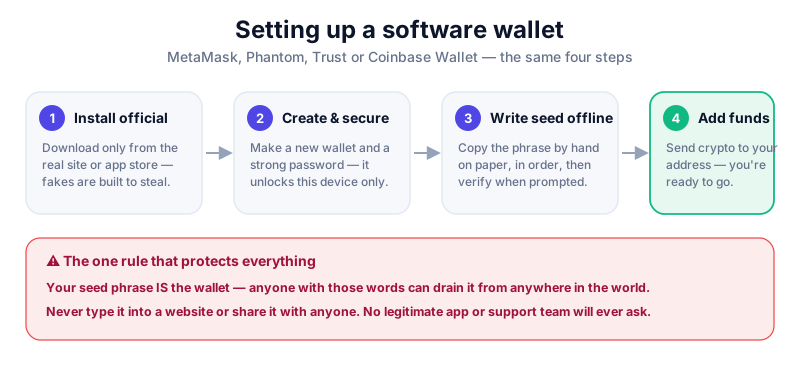
Install Phantom only from phantom.app or an official app store. Create a wallet, then write your 12-word recovery phrase on paper and keep it offline. That phrase controls your funds — never type it into a website or share it with anyone.
Before you start
Phantom is a self-custody wallet — you hold the keys, and there is no company that can reset a lost backup or reverse a transfer. That independence is the point of crypto, but it means your recovery phrase is the one thing you must protect above all else.
- A desktop browser (Chrome, Firefox, Brave, Edge) or a phone.
- Pen and paper for the recovery phrase — not a notes app or photo.
- A few quiet, unrushed minutes.
Step 1: Install Phantom safely
Only download Phantom from the official source: phantom.app for the extension, or the Apple App Store / Google Play for the app. Solana's popularity has made fake Phantom extensions and apps common, and they are built to steal your phrase.
Beware look-alikes
Search ads and copycat sites frequently impersonate Phantom. Type phantom.app directly, confirm the extension is published by 'Phantom', and check the review count before installing.
Step 2: Create and back up your wallet
- Open Phantom and choose 'Create a new wallet'.
- Set a strong password (extension) or app lock — this protects the app on this device only.
- When Phantom shows your 12-word recovery phrase, write it on paper by hand, in order.
- Confirm the phrase when asked, then store the paper offline — ideally two copies in two locations.
- Never screenshot the phrase or save it to a computer, cloud note, or password manager.
Guard your recovery phrase
Anyone with your 12 words can empty your wallet instantly. Phantom support will never ask for it, and no legitimate service ever will. If a site, DM, or 'support agent' asks you to enter it, it is a scam — walk away.
Step 3: Connect to apps and stay safe
To use a Solana app, NFT marketplace, or DeFi protocol, you connect Phantom and approve actions. Read every pop-up carefully — Phantom shows a simulation of what a transaction will do, which helps you catch a wallet-draining request before you sign it.
- Treat unexpected tokens or NFTs that appear in your wallet as suspicious — don't interact with them.
- Never sign a transaction you didn't initiate, and disconnect from sites you no longer use.
- For larger holdings, link Phantom to a hardware wallet so keys stay offline.
Phantom can connect to a Ledger so every transaction is approved on the device itself. The Ledger Nano X is our top pick — read the full review first.
Key takeaways
- Only install Phantom from phantom.app or an official app store.
- Write your 12-word recovery phrase on paper and store it offline.
- No legitimate service will ever ask for your recovery phrase.
- Use Phantom's transaction preview and connect a hardware wallet for larger sums.
Frequently asked questions
Is Phantom only for Solana?
It started as a Solana wallet but now supports Ethereum and other chains too. Always select the correct network when sending or receiving funds.
Is Phantom free?
Yes, the wallet is free. You pay only the network fees for transactions, which on Solana are typically very small, plus a small fee if you swap tokens in-app.
What if I lose my phone or computer?
Reinstall Phantom on a new device and restore using your 12-word recovery phrase. That phrase — not your app password — is your real backup, so keep it safe.
Keep reading
How to Set Up MetaMask (Step by Step)
A beginner's guide to setting up the MetaMask wallet safely: install the extension, back up your seed phrase,
How to Set Up Trust Wallet (Step by Step)
Set up the Trust Wallet mobile app safely: download it from the right place, back up your recovery phrase, and
What Is Solana? A Plain-English Guide
A beginner-friendly explanation of Solana (SOL): what it is, how it differs from Bitcoin and Ethereum, what it